
Showing posts with label SQL Server. Show all posts

Tuesday, 8 September 2015

Strategies for managing an enterprise - Policy Based Management (T-SQL Tuesday)

You may be aware of T-SQL Tuesday; it's a concept conceived by Adam Machanic ( b | t ) some years ago, to encourage a number of posts on a different specific topic on a monthly basis. This month's topic, as hosted by Jen,McCown, is Strategies for managing an enterprise.

A Strategy is a plan of action designed to achieve a long term goal or aim, so I thought I'd write about how I'd planned and achieved a solution to the problem of assuring myself and the business that our SQL servers met the policies and best practices we aspired to achieve.

I had recently been faced with the need to gain confidence in the state of a set of SQL Servers whose management hitherto has at best been a part time activity, and not owned by any one person or group. This had meant that, understandably, consistency and best practice have suffered, to the extent that a base level of audit and assurance is required. There's a few ways to achieve this, and I needed to come up with a strategy that would hit several goals.

Easy to implement

Technically advanced technologies are great, but sometimes you just need basic checks and the ability to build on the basis they provide. In our case, we needed to use the existing skills base to achieve our goal.

Automated

I didn't have the luxury of assuming there will be a full time DBA in the organisation in the future, and in any case we are always pushed to do more with less resource, so it is likely that any solution that involves manual steps will not be carried out regularly. We therefore needed an automated solution.

Visible

For any audit tool to be effective, particularly a tactical one, we needed to be able to provide a level of reporting, to allow the business to perceive the health of the assets, and have confidence that issues are addressed.

Comprehensive

There's no point in having a solution that doesn't cover all the bases. We needed one that will allow us to expand on the 'out of the box' functions to do custom metrics.

Cost effective

There are a lot of valuable solutions out there that really do provide great monitoring for large server estates, allowing real-time automated resolution of issues, and confirmation of policy adherence. Our needs were more modest however, and it should be noted that the goal was to achieve the monitoring without spending out on licences; this is something we can aspire to once the base level of audit is in place.

So once these goals are defined, I looked at some options. Third party solutions like Nagios, which is a great monitoring tool I've used in the past, were not an option due to existing skills bases. I needed to use something that would use existing developer or administrative skillsets. I explored Policy Based Management (PBM) in SQL server, and decided this was a good avenue because it allowed simple best practices to be easily monitored, in some cases bad practices prevented, and could be easily rolled out to the enterprise via a central management server

Using PBM, you can write policies that prevent some behaviours, but due partly to existing codebases, and in some cases third party products that we can't modify, as well as a relatively relaxed regulatory framework, I've chosen to alert rather than prevent. I can write conditions that only target certain server classes, and have taken to using extended properties on databases to denote whether certain conditions apply (and on the master database to denote server environment characteristics, such as Production/UAT/Dev). This gives the flexibility to write one policy for a condition and have it apply wherever an applicable system is hosted in the enterprise.

This setup was still missing one part however - the visible bit. By default, when you have a non-compliant server, all you get is an icon in SQL Server Management Studio, and an error code fired which means you can alert via an event. This isn't even very visible if you know what you're looking for - and doesn't tell you what's wrong.

The solution was to use the Enterprise Policy Management Framework, a combination of Powershell and SSRS to query an estate of servers and present the results in a report, which could be displayed centrally (think intranet, or screen in the management office), or scheduled and circulated like other SSRS reports, and is simple to visually check on a regular basis - a screen full of red is bad!

Did it work? Certainly, and it allowed identification of issues such as backups being missed off the schedules, security permissions which were against policy, orphaned users and the like. This allowed the strategy to achieve the aim of giving confidence in the level of servers across the enterprise.

There are some areas for further thought, not least in terms of the security permissions required to run reports, which are necessarily high - however any system which monitors areas such as sensitive configuration will require a comparatively high level of access. I'm also looking at modifying some of the reports to better fit our needs, but this is a minor change given the data is now in place.

I found that adopting a strategy of implementing a monitoring solution to check the basics are in place has given me the confidence that we have a firmer base to build on. The strategies and goals they aim to achieve will evolve, as they all should, as time is freed up and the needs of the business dictate.  I've not given up on implementing a more integrated monitoring solution in the longer term, but this is a great way of assuring the business that the service we provide is fit for purpose, and can be relied upon.

Sunday, 8 June 2014

Check constraints not what you thought they were?

I was recently adding a check constraint to a table in SQL Server, and noted some behaviour which surprised me, so I thought I'd share it with you. I've tried this on SQL Server 2012 and 2008 R2.

I added two fields, which either both needed to be null or both filled in. (Now, it is possible this requirement points to a normalisation requirement - but that's not the point at hand). So the check constraint is simply to ensure that either:

  • Field A is null AND Field B is null
OR
  • Field A is not null AND Field B is not null 

So I used the following check constraint:


USE tempdb


CREATE TABLE AllOrNothing
    
(
      
id INT IDENTITY(1, 1) ,
      
FieldA VARCHAR(100) ,
      
FieldB VARCHAR(100)
    )


ALTER TABLE AllOrNothing ADD CONSTRAINT UK_AllOrNothing 
    CHECK (
             (FieldA IS NULL AND FieldB IS NULL) 
           OR 
             (FieldA IS NOT NULL AND FieldB IS NOT NULL)
           )


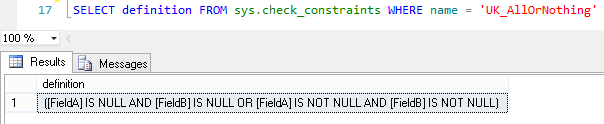
Now, what surprised me was when I queried sys.constraints on this:


and again if I modify the constraint in SQL Server Management Studio:


The brackets have gone! Now, this isn't going to affect the functionality due to the precedence order of the logical operators, but will still have a SQL Developer looking at it and wondering if the intended functionality is what's been put in place. (Of course, the best way to be sure is to unit test your code).

I thought I'd blog about this, as whilst it doesn't change the function of what's been coded, it does change the form of it, which is unusual and was to me unexpected.


Monday, 30 September 2013

A word on data types

I came across a situation today where there was clearly confusion as to data types and numeric representation.

The basic issue at hand was how to represent a large number in SQL Server.

Now, SQL Server has a number of data types, which are essentially ways of representing data so that SQL Server can understand something about them. Each bit of data in SQL server needs to have one of these types. Some of these are used for numbers, and that is where our problem starts.

There are specific ranges of data that can be represented in each, and a corresponding amount of storage used. Clearly this is a concern for DBAs and DB designers who need to calculate storage space for millions of potential records. For example, the Numeric / Decimal types have the following possibilities:

Precision
Storage bytes
1 - 9
5
10-19
9
20-28
13
29-38
17

What this really means is that a number with a precision of 10 takes up nearly twice the storage space of a number with a precision of 9, but that storage space is only affected when you get beyond certain values - which may mean that you can use more precision for no storage space cost. Precision here is the number of digits that are stored (the total number including those both to the left and right of the decimal point).

The general rule I use is that one should use an appropriate type for the meaning of the data (i.e. if you're storing a number, use a type that is recognised as a number, if you are storing text, use a character-based type, if you are storing a date and time, use a type designed for the purpose, etc).

Of course, there is an obvious problem here. What can we do to store a number that has 39 digits in it?

Well, you cannot store a number in a data type that is outside the range of it. You need to pick an appropriate value. There are two solutions here - The application could report an error as the data is not able to be represented, or (more sensibly) the appropriate data type should be used. For some applications, you may only care about the significant digits (and not the final accuracy) so a float data type may be appropriate.

These are decisions that ideally would be taken by a database designer before an application is commissioned with full knowledge as to the intended use of the field, and certainly changing data types takes communication between various parties as you would ideally change the data type in the application, and everywhere that data is used in the database, to minimise implicit conversions and any resulting performance issues or rounding / truncation.It is something to be very careful of in an agile environment where you may find that data changes during development.

A word on the storage of numbers. If you are looking to store the data '9E10' then this could be a string data type (a digit nine, an E, a one and a zero), perhaps an equipment model number, or it could be representing 90000000000 (9*10^10). This is one reason why the data type is important, and typed data is more meaningful than untyped data. It would be stored differently, depending on the data type, and to SQL Server these different interpretations are not necessarily the same information (although if implicitly converted they could be perceived as such). This can lead to unexpected behaviour from your application.

Dates have a similar ambiguity to them, but with the added ambiguity that you don't know if 3/2/13 represents the 3rd of Feb (UK format) or 2nd of March (US format). For this reason it is always a good idea to use a specific date-based data-type (there are some such as the Date type that only store the day, and others such as datetime, datetime2 or smalldatetime that store various precisions of time as well). If you must use a string type to represent data (for example in printed output) then it is advisable to use an unanbiguous format, such as ISO8601 detailed - CCYY-MM-DD.

I hope this has clarified some of the uncertainty over date types.

Tuesday, 2 July 2013

Book Review - SQL Server Transaction Log Management

I was recently sent a review copy of "SQL Server Transaction Log Management" by Tony Davis and Gail Shaw, a new book from Red Gate (who publish the SimpleTalk series of websites and books.
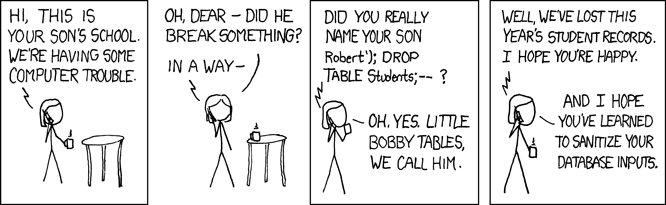
Image of book cover
This book is part of the Stairway series of books, and as such tackles a narrow subject, but from the very basics to an expert level. I found that the process of building from simple basics to a more in depth discussion of the technical details was accessible both to those who might have inherited a system and need to know how to properly configure it to minimise risk, and those who have a more detailed understanding.

Whilst this book does tackle data recovery, it is more about prevention and putting yourself in the position of avoiding the disaster in the first place. The process used in this book allows you to take a look at the reasons why you would choose to manage your transaction log in various ways, what implications this might have, and how that might impact upon your service level agreements (time and amount of potential data loss in a disaster) to the business. It deals with why and how to back up the transaction log in order to minimise data loss, and the implications of a corruption or loss of a log backup.

The book has detailed chapters on Full and Bulk Logged recovery modes, and even deals with Simple mode, and the ways in which the transaction log is used in each of them. It also goes through common scenarios (run away growth of a transaction log, disaster recovery, switching modes) to examine the implications and ways forward for each. It also looks at how to optimise your log so that you get the best performance for your intended use of the system, and how to monitor the log to check it is working optimally.

The style of the book is very much that of a taught example, and as such it allows the reasons why a course of action is desirable (or not) to be reinforced with a worked example, and specifies where decisions have been taken that aren't ideal for a production environment.

This is the sort of book I would give to a Junior DBA, to familiarise him or her with why transaction logs are configured as they are, and will keep for my own shelf to remind myself of the more technical details as to what is going on inside SQL Server in various log operations.

Saturday, 5 January 2013

Get your 'learn' on in 2013

Continuous personal development is an important part of most chartered professions - Doctors, Dentists, Architects, Engineers, etc., and I can't help thinking it's a good thing - the state of knowledge within most areas is constantly expanding and the more knowledge your Doctor has, the better treatment you can get. It's a good thing that Architects can learn new things - it means that we get better buildings.

The rate that the IT field is changing is also rapid. This means that we have to continuously improve our knowledge in order simply to stand still. It's something that some employers will help with, particularly if the topic is relevant to upcoming work, but if your employer doesn't feel able to pick up all of the cost, there are lots of ways to help persuade them that it's cheaper than they think - and your showing an interest will probably tip the balance; it could also help them perceive you as a more enthusiastic and valuable employee.

However, not all conferences need cost you lots of money, if you can get yourself there and make the time.

As you may know, I am a regular attendee at the SQL South West User Group, and the group organisers, FatherJack and Mrs_Fatherjack are putting on the latest SQL Saturday event in Exeter (UK) on the 8th and 9th of March. The Friday is a paid day of deep-dive sessions (with a discount of 19% if you register by 31st January) and Saturday the 9th is a day of 1 hour long sessions on a variety of topics. These are usually long enough to cover a subject, without being too detailed. That means they're suitable for a variety of levels of knowledge.

The SQL Bits team are again putting on a conference on the first weekend in May (a bank holiday weekend), this time in Nottingham. I've written about my experiences attending an earlier SQL Bits conference and I'd highly recommend it.

If you can't free up the weekend of a conference, your local user group can be a gentler introduction, and you will find a list of UK SQL learning opportunities here.You can also see recordings of past sessions from most conferences online at your convenience, but of course that does mean you miss the networking opportunities that attendance at the event brings.

If you've been to conferences in the past, why not contribute back to the community, and submit a session for a conference, or speak at a user group? SQL Saturday 194 is accepting sessions until Monday 8th January 2013, and SQL Bits session submission is also open. Both events welcome submissions from new speakers.

Wherever you are in your career, I hope that you embrace the challenge of learning something new this year.

Thursday, 2 February 2012

Implicit transactions, cancellation and implicit rollbacks.

Having had some fun at work today tracking down an issue with transactions, I thought I'd run through exactly when a transaction is rolled back or kept open. I'm doing all this in SQL Server Management Studio, and all snippets have been run on Microsoft SQL Server 2008 R2 (SP1) Express Edition.

You are probably familiar with the basic form :

BEGIN TRAN

      /*DO SOMETHING */

COMMIT TRAN

And even the more complicated:

BEGIN TRAN

BEGIN TRY

     /* DO SOMETHING */

     COMMIT TRAN

END TRY

BEGIN CATCH

      /* If we hit an error, rollback the transaction */

      ROLLBACK TRAN

END CATCH


However, did you know what happens to the transaction when queries are cancelled? Let us investigate.

So, I'm going to use the @@TRANCOUNT operator to display how many transactions are open at various points. More information about @@TRANCOUNT, including information on nested transactions can be found on MSDN.


Let's see what happens as standard in a "normal" situation:

SELECT BEGINNING = @@TRANCOUNT

BEGIN TRAN

     SELECT MID_TRAN = @@TRANCOUNT

ROLLBACK TRAN

SELECT AFTER_ROLLBACK = @@TRANCOUNT

This produces the output:
BEGINNING

-----------

0

MID_TRAN

-----------

1

AFTER_ROLLBACK

--------------

0


This is what we would expect - the rollback rolls back all transactions.

But what about if execution is aborted (i.e. the caller presses the stop button)?

Lets see - Try running the following:

BEGIN TRAN

BEGIN TRY

     /* DO SOMETHING */

     WAITFOR DELAY '00:05:00' --Press cancel (stop button) whilst waiting here

     COMMIT TRAN

END TRY

BEGIN CATCH

     /* If we hit an error, rollback the transaction */

     ROLLBACK TRAN

END CATCH

Whilst this query is running, press the stop button. You might expect that the abort / stop would trigger a rollback, either implicitly or via the try/catch block. In fact, neither of these things happens; to check this run :

PRINT @@trancount

You will find that the answer is 1. This means that the transaction is still going.

Ok, so what harm can this cause? Well, let's look at an example scenario. Run the following in a new window:

CREATE TABLE MyScore (PersonID INT, Score INT);

INSERT MyScore (PersonID,Score) values (1,15)

BEGIN TRAN

     UPDATE MyScore SET Score = 10 WHERE PersonID = 1

     WAITFOR DELAY '00:15:00' --Cancel whilst waiting here

COMMIT TRAN

Leave it running this time.
In a new Query window, run the following:

SELECT @@TRANCOUNT

GO

SELECT
* FROM MyScore

This will display a 0 for the trancount, before hanging as the initial transaction is still open. Thus, an open transaction is preventing an unrelated connection from reading data.

Now stop and close this second query, and stop the first one by pressing the stop button. In the first connection (query window), run the following:

BEGIN TRAN

     SELECT first_trancount = @@TRANCOUNT

     UPDATE MyScore SET Score = 11 WHERE PersonID = 1

ROLLBACK TRAN

SELECT second_trancount = @@TRANCOUNT

SELECT * FROM MyScore

This will do a seemingly unrelated update, then run a rollback.

Lets look at the results:

first_trancount

---------------

2


second_trancount

----------------

0


PersonID Score

----------- -----------

1 15

This isn't quite what we expected; the first trancount was 2, showing that both transactions were active at the time. The second trancount was 0, as all active transactions are rolled back by a rollback command. This means that the first update was rolled back too, and we are left with the original table data.

This behaviour, which has been documented at http://support.microsoft.com/kb/295108 can be a particular problem when calling stored procs which contain explicit transactions in them, and is best mitigated with the SET XACT_ABORT ON command. The default setting is off, which means that only the statement which errors will be rolled back, and not the transaction.

This behaviour is also exhibited in client applications which close the connection abruptly; particularly in the case of timeouts, and made all the worse on pooled connections.

This is explored a little more deeply in this post on Dan Guzman's blog.
Whilst transactions certainly have thier place in data updates, you need to be aware of what can happen if the query is cancelled, or a timeout occurs when you are using them, particularly in stored procedures which are called by an application which can time out.

You also should be aware that whilst a COMMIT statement commits the inner most transaction, a ROLLBACK statement will reverse ALL uncommitted transactions on the connection.

Further reading on how to use transactions (both implicit and explicit) can be found at http://msdn.microsoft.com/en-us/library/ms175523.aspx.

Sunday, 20 November 2011

SQL Injection

At the November meeting of the SQL South West user group I gave a presentation on SQL Injection attacks. My main reason for giving the presentation was that I have been surprised by the number of SQL Developers (and DBAs) who don't know what this is - or have the ability to justify why they should care about it to thier management. As it's one of the most used attacks (http://cwe.mitre.org/top25/#CWE-89) it clearly isn't as well prevented as it should be, and it can be quite powerful. It's also been around a long time - hence the famous XKCD comic:


Explots of a Mom - http://xkcd.com/327/

I aimed this talk / post at those who haven't heard of, or don't know much about SQL Injection. I'm going to run through the highlights of the talk - and you can download the PDF file.

I'm going to run through the demonstration I gave below - please do read the PDF file to get more details on the presentation itself. I've ignored the danger of code which is in the application and does the same sort of thing - but clearly this is susceptible to a few more tricks, as well as those below.

Some prerequisites - I'm using the AdventureWorksLT2008 database which is available for download.

I'm using a couple of stored procedures, which I will call from a purpose built web page. The first one is :
CREATE proc [dbo].[Concatenated] (@CustomerLastName Varchar(500))
as
/* SP to demonstrate SQL Injection Attacks - http://d-a-green.blogspot.com/  (an example of what NOT to do!)*/
insert tbl (msg)
select 'select CustomerID,Title,FirstName,MiddleName,LastName,EmailAddress,''Concatenated''
as SP from SalesLT.Customer where LastName = '''+@CustomerLastName+''''
exec ('select CustomerID,Title,FirstName,MiddleName,LastName,EmailAddress,''Concatenated''
as SP from SalesLT.Customer where LastName = '''+@CustomerLastName+'''')

This is a stylised example of something that is often used - and shouldn't be.
The second SP I created was :

ALTER proc [dbo].[Parameterised] (@CustomerLastName Varchar(500)) as
/* SP to demonstrate SQL Injection Attacks - http://d-a-green.blogspot.com/  A better solution*/
select CustomerID,
Title,FirstName,MiddleName,LastName,EmailAddress,'Parameterised' as SP
from SalesLT.Customer where LastName = @CustomerLastName

Now, clearly these aren't doing anything tricky, and as you can see they accomplish the same thing. The difference is in how they work. The first SP, 'Concatenated', "trusts" the input from the client. Whoever that may be. In normal circumstances we would expect this to be the designed application, but this assumes that nothing else is passing in the data.

Anyway, let's see the application we're calling, with a typical output:


You can see that the screen is split into two return grids - these are to show the respective outputs of the two stored procedures. Notice also that seven columns of data are returned - and these look like a table.

So, one way of indicating that SQL Injection would work, is if you get an error, or unexpected data (or lack thereof) if you put a single appostrophie in the input. So, noting that we had seven columns before, let's see what we can do.

We can type the following into the text box to show us all customer records
Harris' or 1=1 --
This could be sold to a competitor, used to embarass the company concerned, or to send targeted "phishing" emails to the users (particularly to those with recent orders).  We can also combine this with use of the
UNION
command to get information from other tables or views.
The -- on the end stops any further clauses executing, and prevents the closing apostrophie in the stored procedure causing an error.


We can see what tables are in the database (this can be adapted to list SPs, too):
Harris' union select 1,'a',TABLE_SCHEMA,TABLE_NAME,'a','a','a' FROM INFORMATION_SCHEMA.TABLES -- 

We can also see who can log into the server (note, I've used a name at the beginning that won't return a result so I only get the answers I want returned to me. This is more convenient!):
fHarris' union all select 1,'a',name COLLATE DATABASE_DEFAULT ,'a','a','a','a' from master..syslogins where isntname = 1 --

Clearly this application isn't now doing what it should be - it has been subverted and can do as the attacker wishes.
Other possiblities include (depending on what user the system is running as)
  • Command shell - with all it's possibilities.
  • Linked Server - Am I running as the same user as another machine?
  • Do I have email enabled? Can I enable it? This is a much more convenient way of obtaining data.
  • Can I create a trigger to use email to send me updates in the future, potentially after this method of getting in is fixed?
 I've not demonstrated it in this post, but you can also use encoded statements to get round checking for key words (delete, update, drop, etc).

Note, I've used SQL Server here, but these points are valid on most RDBMS' - you just tailor them to the environment - the errors you get or characters/methods that work can even help you to determine what the server at the other end is running, and from that what you can do.

I hope I've demonstrated what a simple thing an SQL Injection attack is, and how easy it is to prevent - note that the parameterised proc prevented these. If you must use dynamic SQL in your SPs, please use sp_executesql with parameters. Please also restrict the permissions of the web application to the bare minimum needed.

There's some more details of walk-throughs on the slides, and what some of the potential ramifications are of the attack - do take a look.

Thursday, 20 October 2011

Foreign Keys - a quick recap.

What are foreign keys for? A foreign key is used to allow data in one table to be checked against another (reference) table.

A foreign key will also prevent the referenced (master) table from being dropped. Consider this code snippet:
IF EXISTS (SELECT object_id(N'dbo.mst'))
DROP TABLE dbo.mst
CREATE TABLE dbo.mst (
id INT IDENTITY(1,1) PRIMARY KEY
,txt varchar(10))

INSERT dbo.mst (txt) VALUES ('foo'),('bar')

CREATE TABLE dbo.child (id INT IDENTITY(1,1) PRIMARY KEY
,name varchar(100)
,mstid INT)

ALTER TABLE [dbo].child  WITH CHECK ADD  CONSTRAINT [FK_CHILD_SINGLE] FOREIGN KEY(mstid)
REFERENCES [dbo].mst ([id])

This code works fine once, as dbo.mst does not exist, so the drop table is not run. However once the check constraint is in place, the run will fail:
Msg 3726, Level 16, State 1, Line 2
Could not drop object 'dbo.mst' because it is referenced by a FOREIGN KEY constraint.
Msg 2714, Level 16, State 6, Line 3
There is already an object named 'mst' in the database.

Foreign key behaviour

Having created the child table, let’s put some data in it:
INSERT dbo.child
        ( name, mstid )
    VALUES
        ( 'Barney', 1 )

(1 row(s) affected)
Great! We can verify that the data has been inserted by selecting records from the child table.
Now,  what if we try to insert a record where the mstid doesn’t exist in the mst table?

INSERT dbo.child
        ( name, mstid )
    VALUES
        ( 'Fred', 0 )

We would not expect this to work, and sure enough:

Msg 547, Level 16, State 0, Line 1
The INSERT statement conflicted with the FOREIGN KEY constraint "FK_CHILD_SINGLE". The conflict occurred in database "Test_DB", table "dbo.mst", column 'id'.
The statement has been terminated.
Now, lets say we have the situation where we would like to have a foreign key on a non-mandatory value.
INSERT dbo.child
        ( name, mstid )
    VALUES
        ( 'Wilma', null )
(1 row(s) affected)
So if the field is null, then it isn’t considered to break the foreign key.

Thus, a Foreign Key can be summarised as a check on whether a value that exists is actually part of the referenced set.

What about composite foreign key behaviour?

A quick search of Books Online produces the following (from http://msdn.microsoft.com/en-us/library/ms175464.aspx) :
“A FOREIGN KEY constraint can contain null values; however, if any column of a composite FOREIGN KEY constraint contains null values, verification of all values that make up the FOREIGN KEY constraint is skipped. To make sure that all values of a composite FOREIGN KEY constraint are verified, specify NOT NULL on all the participating columns.”
So, that’s an interesting nugget. Let’s test this. A different table structure is called for:
IF EXISTS (SELECT object_id(N'dbo.child'))
DROP TABLE dbo.child
IF EXISTS (SELECT object_id(N'dbo.mst'))
DROP TABLE dbo.mst
CREATE TABLE dbo.mst (
id INT
,idtwo INT
,txt varchar(10)
,Primary key (id, idtwo)
)

CREATE TABLE dbo.child (id INT IDENTITY(1,1) PRIMARY KEY
,name varchar(100)
,mstid INT
,mstidtwo INT
)

ALTER TABLE [dbo].child  WITH CHECK ADD  CONSTRAINT [FK_CHILD_DOUBLE] FOREIGN KEY(mstid,mstidtwo)
REFERENCES [dbo].mst ([id],idtwo)
And some data:
INSERT dbo.mst (id,idtwo,txt) VALUES (1,1,'foo'),(1,2,'bar')

INSERT dbo.child
        ( name, mstid, mstidtwo )
    VALUES
        ( 'test both valid', 1, 1 )
         
INSERT dbo.child
        ( name, mstid, mstidtwo )
    VALUES
        ( 'test not valid', 1, 3 ) 
         
INSERT dbo.child
        ( name, mstid, mstidtwo )
    VALUES
        ( 'test one valid other null', 1, null )        
         
INSERT dbo.child
        ( name, mstid, mstidtwo )
    VALUES
        ( 'test both null', null, null )  
INSERT dbo.child
        ( name, mstid, mstidtwo )
    VALUES
        ( 'test one valid other null 2', null, 2 )                    
So, what results?
SELECT * FROM dbo.mst

ididtwotxt
11foo
12bar
SELECT * FROM dbo.child


idnamemstidmstidtwo
1test both valid11
3test one valid other null1NULL
4test both nullNULLNULL
5test one valid other null 2NULL2
That’s a little odd..  The only record that failed was the one that had known wrong (as opposed to null) values.
This is the natural extension of the single-field version, but still a bit of a surprise, and one that could trip you up if you didn’t expect it.

What about if we follow the advice from Books Online, and make the columns non-nullable?

Well, the first thing to note, is that it isn’t the columns in mst that must be non-nullable, it’s the columns in the child table. This is key (if you want to prove it to yourself, try altering the above code to match!)

So, if we change the child table to be
CREATE TABLE dbo.child (id INT IDENTITY(1,1) PRIMARY KEY
,name varchar(100)
,mstid INT NOT NULL
,mstidtwo INT NOT NULL
)
And then re-run the insert statements from above, what do we get?

As might be predicted, the output looks like :
 
idnamemstidmstidtwo
1test both valid11
However, let's look at the messages returned:
(2 row(s) affected)

(1 row(s) affected)
Msg 547, Level 16, State 0, Line 11
The INSERT statement conflicted with the FOREIGN KEY constraint "FK_CHILD_DOUBLE". The conflict occurred in database "Test_DB", table "dbo.mst".
The statement has been terminated.
Msg 515, Level 16, State 2, Line 19
Cannot insert the value NULL into column 'mstidtwo', table 'Test_DB.dbo.child'; column does not allow nulls. INSERT fails.
The statement has been terminated.
Msg 515, Level 16, State 2, Line 27
Cannot insert the value NULL into column 'mstid', table 'Test_DB.dbo.child'; column does not allow nulls. INSERT fails.
The statement has been terminated.
Msg 515, Level 16, State 2, Line 34
Cannot insert the value NULL into column 'mstid', table 'Test_DB.dbo.child'; column does not allow nulls. INSERT fails.
The statement has been terminated.

(2 row(s) affected)

(1 row(s) affected)

We note that the insert wasn’t refused by the Foreign Key if there were nulls in the table – the ‘nullability’ of the column takes precident over the Foreign Key. This makes sense as it’s quicker to validate when only looking at one table, but still a point of note.

This means our conclusion of “a Foreign Key can be summarised as a check on whether a value that exists is actually part of the referenced set” is still true, but it’s worth being aware of where the model can break down if you allow null values in the set.