Users of SQL Test and the tSQLt framework upon which it is based have noted in the past that because test objects are stored in the database, they can be difficult to differentiate from the objects under test. This has been a barrier to some users adopting tSQLt for unit testing, as it prevented separate management of tests and raises the potential danger of tests being accidentally deployed within a production environment.
Recently I have been using tSQLt within SSDT (following this method by Ken Ross), and it occurs to me that this method of controlling unit tests allows us to keep the code under test in a different project to our tests, and therefore overcome the difficulty of keeping our tests as database objects. When we have our tests in a separate project within the same solution, we can choose to deploy either the tests with our code under test or simply the code itself without the tests. By configuring the test project to ensure that it requires the code under test to also be deployed at the same time and into the same database, we can set up publish definitions for the tests to our development machine and also a publish definition for just the code under test. It's the latter which we would use to deploy outside of our development workstation, for example to UAT. It also means that if you deploy by DACPAC the tests have never been in that package, so it is ready to deploy to each environment without your needing to take any additional steps.
Of course, a Continuous Integration engine has access to both projects within the solution from source control so it can either include unit tests or not, depending on your desired build action.
By having both the code under test and the tests themselves within the same solution, we can use the same source control process allowing both the code under test and the tests themselves to be in one place, which prevents drift between the test and the code under test.
When developing databases in SSDT, using this method gives me the best of both worlds; tests which to live with the database under development including within source control, and yet do not need to be removed from the database as part of or after the deployment process.
Showing posts with label T-SQL. Show all posts
Showing posts with label T-SQL. Show all posts
Wednesday, 26 February 2014

Saturday, 30 November 2013
Using Insert Exec with multiple result sets
Sometimes, there is a need to get result sets from a stored procedure into a table. One deceptively simple method is with a Insert..Exec statement.
This works fine for a simple example such as:
This returns our table, as we might expect.

However, the situation gets a little more complex if we return from our stored procedure two datasets, which have the same metadata:
Now, when we run our code to capture the dataset we get:
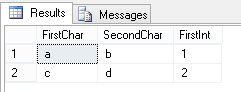
This is perhaps a little surprising - and gives us the scenario where the results from our stored proc are indistinguishable from what we would get if we had:
However, if we accessed this same data via a different method (e.g. from CLR or an application looking at distinct result sets) these would be distinguishable. This is in my opinion counter intuitive behaviour which can give us a misleading result.
Suppose you were capturing a result which would be either in the first result set or in the second (the other to be returned empty). It follows that you couldn't use Insert..Exec to capture this as you would be unable to determine which set had caused it. In other words, the results returned using Insert Exec with the following two queries are indistinguishable:
Try running the queries individually and you will see what I mean!
This is something to be aware of, both when coding and testing stored procedures, especially if Insert..Exec is used to capture information.
This works fine for a simple example such as:
USE tempdb
GO
CREATE PROC dbo.tempproc AS
    SELECT  'a' AS FirstChar ,
            'b' AS SecondChar ,
            1 AS FirstInt

GO
DECLARE @table TABLE
    (
      FirstChar CHAR(1) ,
      SecondChar CHAR(2) ,
      FirstInt INT
    )
INSERT  @table
        EXEC dbo.tempproc
SELECT * FROM @tableThis returns our table, as we might expect.
However, the situation gets a little more complex if we return from our stored procedure two datasets, which have the same metadata:
ALTER PROC dbo.tempproc AS

    SELECT  'a' AS FirstChar ,

            'b' AS SecondChar ,

            1 AS FirstInt


    SELECT  'c' AS FirstChar ,

            'd' AS SecondChar ,

            2 AS FirstInt

GO
Now, when we run our code to capture the dataset we get:
This is perhaps a little surprising - and gives us the scenario where the results from our stored proc are indistinguishable from what we would get if we had:
ALTER PROC dbo.tempproc AS

    SELECT  'a' AS FirstChar ,

            'b' AS SecondChar ,

            1 AS FirstInt

           UNION ALL

    SELECT  'c' AS FirstChar ,

            'd' AS SecondChar ,

            2 AS FirstInt

GO
However, if we accessed this same data via a different method (e.g. from CLR or an application looking at distinct result sets) these would be distinguishable. This is in my opinion counter intuitive behaviour which can give us a misleading result.
Suppose you were capturing a result which would be either in the first result set or in the second (the other to be returned empty). It follows that you couldn't use Insert..Exec to capture this as you would be unable to determine which set had caused it. In other words, the results returned using Insert Exec with the following two queries are indistinguishable:
ALTER PROC dbo.tempproc AS

    SELECT TOP 0 'a' AS FirstChar ,

            'b' AS SecondChar ,

            1 AS FirstInt


    SELECT  'a' AS FirstChar ,

            'b' AS SecondChar ,

            1 AS FirstInt

GO
ALTER PROC dbo.tempproc AS

    SELECT  'a' AS FirstChar ,

            'b' AS SecondChar ,

            1 AS FirstInt


    SELECT  TOP 0 'a' AS FirstChar ,

            'b' AS SecondChar ,

            1 AS FirstInt

GO
Try running the queries individually and you will see what I mean!
This is something to be aware of, both when coding and testing stored procedures, especially if Insert..Exec is used to capture information.
Tuesday, 13 August 2013
What happens when the audit trail meets a data migration?

This is a post inspired by the T-SQL Tuesday blog party series; this month (#45) the topic is hosted by SQLMickey. The topic this month is Auditing, so I thought I'd write some thoughts on how to deal with auditing when doing a system migration.
Most systems have an audit trail of sorts, for legal or compliance reasons, or possibly just to make the system administrator's life easier. The idea is that this forms a permanent record of who did what, when.
What happens to this when it's time to change the system or migrate the data out to a new system? How so you retain the audit trail, both of the old system and prove the methods used to transfer the data haven't changed it?
There are many types of audit trail, including paper based ones, but during IT projects focus is usually concentrated on the electronic ones built into systems. Usually, you cannot import the trail from an old system into your new system, as that would imply an editable audit trail. This means that you have to use another method in order to maintain traceability and the link between the old system including the data in it and the new.
If the old system is being maintained then it may be sufficient to simply keep the old system logs where they are, and keep accurate records as proof of how this was transferred to the new system.
During the planning stages of an ETL migration it is likely that documentation will have been developed and this can be retained as proof of how the data was to be migrated.
During the planning stages of an ETL migration it is likely that documentation will have been developed and this can be retained as proof of how the data was to be migrated.
This may be in the form of data maps, or instructions, but needs to be at the detailed level necessary to provide the required traceability.
By migrating data between systems you break the continuity of the records, so it is important that the records you keep are sufficient, and I find that it's best to involve the person from the business who has to defend items to an external auditor at an early stage, as they need to be comfortable that sufficient records are kept. This may involve data that will change as part of the migration, particularly when changing between systems that have a different way of organising data internally - but in my experience this is not important if proper records are kept such that the data can be related - in either direction - in the future.
If an old system is being decommissioned, it is important to decide whether the audit trail needs to be kept, and if so for how long, as this may be different to how long the data itself needs to be kept. You may also have decisions to make as to the form in which the data is kept - often this is linked to the cost of storage, for example if storing it in the previous system means that a licence would need to be maintained to access the information, but the sanctity of the audit trail must also be considered if the data is to be exported from the system.
A final point I would make is that however you retain this continuity between the data before and after migration, it is sensible to get someone else to review your work - both in terms of requirements and implementation, and document it so that even your decisions about the audit trail are audited.
Saturday, 27 July 2013
Inserting words in varchars
It recently occurred to me that not all SQL developers are aware of all of the ways to update string data in SQL server.
Let's consider a simple table:
Let's put some data in it:
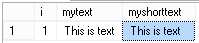
So, let's say you want to insert a word into our text. There are several ways of doing it:
The "left-write-right" method:

This has simplicity, and is easy to understand for the new coder, but is not the only method. You can use the STUFF function:

However, I recently found a method I had been previously unaware of, specifically for the varchar(max), nvarchar(max), varbinary(max) types (it doesn't work on, for example, other varchar fields as they are not treated the same way within SQL server). This is the .WRITE method, used to put some text at the end of a string:
The syntax is:
(if StartPosition is null, the end of the string to be updated is used)
Now, given the alternatives and limitations, why would you use .WRITE? Well, whereas other methods need to read the text, update it, and write it, this only needs change the updated data. This is important where you have large data, as putting text on the end of the column is minimally logged (if you are in bulk-logged or simple modes) which can be faster. This MSDN (see the section "Updating Large Value Data Types") notes that it is most effective if 8060 bytes are inserted at a time.
Let's consider a simple table:
CREATE TABLE TempStuff

    (

      i INT IDENTITY(1, 1)

            PRIMARY KEY ,

      mytext VARCHAR(MAX) ,

      myshorttext VARCHAR(1000)

    )
Let's put some data in it:
INSERT dbo.TempStuff

        ( mytext, myshorttext )
VALUES ( 'This is text', -- mytext - varchar(max)
'This is text' -- myshorttext - varchar(1000)
)
SELECT * FROM dbo.TempStuffSo, let's say you want to insert a word into our text. There are several ways of doing it:
The "left-write-right" method:
UPDATE  dbo.TempStuffSET     mytext = LEFT(mytext, 7) + ' test' + RIGHT(mytext, LEN(mytext) - 7) ,
        myshorttext = LEFT(myshorttext, 7) + ' test'
+ RIGHT(myshorttext, LEN(myshorttext) - 7)
SELECT * FROM dbo.TempStuffThis has simplicity, and is easy to understand for the new coder, but is not the only method. You can use the STUFF function:
UPDATE  dbo.TempStuffSET     mytext = STUFF(mytext, 9, 0, 'stuffed ') ,

        myshorttext = STUFF(myshorttext, 9, 0, 'stuffed ')
SELECT * FROM dbo.TempStuffHowever, I recently found a method I had been previously unaware of, specifically for the varchar(max), nvarchar(max), varbinary(max) types (it doesn't work on, for example, other varchar fields as they are not treated the same way within SQL server). This is the .WRITE method, used to put some text at the end of a string:
UPDATE dbo.TempStuffSET mytext.WRITE(' written at the end',NULL,0)
SELECT * FROM dbo.TempStuffThe syntax is:
StringToUpdate.WRITE(Newtext,StartPosition,CharactersToDelete)
(if StartPosition is null, the end of the string to be updated is used)
Now, given the alternatives and limitations, why would you use .WRITE? Well, whereas other methods need to read the text, update it, and write it, this only needs change the updated data. This is important where you have large data, as putting text on the end of the column is minimally logged (if you are in bulk-logged or simple modes) which can be faster. This MSDN (see the section "Updating Large Value Data Types") notes that it is most effective if 8060 bytes are inserted at a time.
Friday, 21 June 2013
Adding sequential values to identical rows
I was recently presented with a requirement whereby I had a list of orders, with parts, and a list of orders with serial numbers with which I needed to update the original table.
Let's look at the OrderedParts table, which contains a list of the parts used on a customer orders:
This seems straightforward for order number 1252 as the parts are unique, but consider that the orders could be for multiple of the parts, and the only way of telling rows apart is with the serial number, as in order 1234.
Here is our table of available parts with serial numbers:
We will want the OrderParts table to be updated such that the serial numbers X112 and X113 each appear once in it, showing those serial numbers are used in the order.
Let's look at the OrderedParts table, which contains a list of the parts used on a customer orders:
| OrderNo | PartNo | SerialNo |
| 1234 | ABC1 | |
| 1234 | ABC1 | |
| 1252 | XYZ3 | |
| 1252 | HHJ3 |
This seems straightforward for order number 1252 as the parts are unique, but consider that the orders could be for multiple of the parts, and the only way of telling rows apart is with the serial number, as in order 1234.
Here is our table of available parts with serial numbers:
| PartNo | SerialNo |
| ABC1 | X112 |
| ABC1 | X113 |
| XYZ3 | I330 |
| HHJ3 | K283 |
We will want the OrderParts table to be updated such that the serial numbers X112 and X113 each appear once in it, showing those serial numbers are used in the order.
This presents us with a problem in the traditional update statement; how do we join these tables together such that we can update the records correctly?
Well, let us consider the an update statement:
/* Code snippet coded by Dave Green @d_a_green - June 2012*/

/* Set up tables*/
DECLARE @OrderedParts TABLE
(
OrderNo INT NOT NULL ,
PartNo VARCHAR(100) NOT NULL ,
SerialNo VARCHAR(100) NULL
)
INSERT @OrderedPartsVALUES ( 1234, 'ABC1', NULL )
, ( 1234, 'ABC1', NULL )
, ( 1252, 'XYZ3', NULL )
, ( 1252, 'HHJ3', NULL )
DECLARE @Stock TABLE

    (

      PartNo VARCHAR(100) NOT NULL ,

      SerialNo VARCHAR(100) NOT NULL

    )
INSERT @Stock
( PartNo, SerialNo )VALUES ( 'ABC1', 'X112' )
, ( 'ABC1', 'X113' )
, ( 'XYZ3', 'I330' )
, ( 'HHJ3', 'K283' )
--Try joining the tables on the part number
UPDATE @OrderedPartsSET SerialNo = Stock.SerialNoFROM @OrderedParts
INNER JOIN @Stock Stock ON [@OrderedParts].PartNo = Stock.PartNo
SELECT * FROM @OrderedParts
That produces the result:
Which, as you can see has done the instances where only one instance of each part was used in the order (order 1252) , but has not covered instances where multiple of the same part was used in the order (order 1234).
So how can we get round this?
Well, I chose to think about them in terms of "we want the first matching part in the first row, and the second matching part in the second row". This got me thinking about how we arrange the rows - numerically, and about using the ROW_NUMBER() function.
So, we can easily add a row number by using something like:
So - we need to give both tables a row number, and then use this as part of our join criteria for the update:
Using the row number as a joining criteria in this way gives the answer:
This has achieved our desired result, of each available serial number being used uniquely within the order.
| OrderNo | PartNo | SerialNo |
| 1234 | ABC1 | X112 |
| 1234 | ABC1 | X112 |
| 1252 | XYZ3 | I330 |
| 1252 | HHJ3 | K283 |
Which, as you can see has done the instances where only one instance of each part was used in the order (order 1252) , but has not covered instances where multiple of the same part was used in the order (order 1234).
So how can we get round this?
Well, I chose to think about them in terms of "we want the first matching part in the first row, and the second matching part in the second row". This got me thinking about how we arrange the rows - numerically, and about using the ROW_NUMBER() function.
So, we can easily add a row number by using something like:
SELECT *,ROW_NUMBER() OVER (ORDER BY PartNo)FROM @OrderedPartsSo - we need to give both tables a row number, and then use this as part of our join criteria for the update:
UPDATE OrderedParts
SET SerialNo = Stock.SerialNo
FROM    ( SELECT    *,
                    ROW_NUMBER() OVER ( ORDER BY PartNo ) AS RowNumber
          FROM      @OrderedParts
        ) AS OrderedParts
INNER JOIN ( SELECT *,
                  ROW_NUMBER() OVER ( ORDER BY PartNo ) AS RowNumber
           FROM   @Stock
         ) AS Stock ON OrderedParts.PartNo = Stock.PartNo
                       AND OrderedParts.RowNumber = Stock.RowNumber
Using the row number as a joining criteria in this way gives the answer:
| OrderNo | PartNo | SerialNo |
| 1234 | ABC1 | X112 |
| 1234 | ABC1 | X113 |
| 1252 | XYZ3 | I330 |
| 1252 | HHJ3 | K283 |
This has achieved our desired result, of each available serial number being used uniquely within the order.
Monday, 31 December 2012
Testing variable messages just got easier in tSQLt
I recently noticed that the open source unit testing framework I use (and have previously written about) - tSQLt - has had a new release, and with it a new type of assert. Asserts are how you test whether the result you got in a test was what you wanted, and hence whether the test should pass or fail.
This new assert routine, AssertLike, solves one of the more common situations which I've had to work around - that where you know roughly the message you are checking for, but not the totality of it. Let's take the example of a stored procedure which gets all addresses for a given state ID. This is somewhat contrived - there are reasons why you wouldn't do exactly this in a real application, but it makes for an easy to follow example. I'm using the AdventureWorks 2012 database.
This Stored Proc checks that the Province ID exists before it returns the results; this means that no results mean that there are no results, rather than an invalid (or not on record) state. This sort of distinction is quite common for applications where you want to return a more helpful message to the user to allow them to take action.
We can test this SP using the following tSQLt code:
This works successfully, and tests the proc, checking that the correct error message is thrown (i.e. there isn't another error which is causing the proc to fail first).
This is all well and good, but then a requirement for change comes that the error message shown to the caller should specify the erroneous value. This is easily accomplished in the SP:
However, how can we adjust the unit test to accommodate this? The error message will change each time the SP is called - to reflect the input parameter.
The answer has always been to put in place custom logic in the 'CATCH' block - 'If error message is like this, then fine, else fail'.
This is realised in code as:
Of course, if you are checking a specific value, or date/time, this gets more complicated. A line number in the error message makes life even more unpredictable. This is in my view a little ugly, and doesn't lead itself to easy reading in the same way that the simple assert did. The good news is that the latest version of tSQLt now has an AssertLike assert procedure, so we can now simplify this as:
The new assert gives us a standardised approach which also includes a null check (on both sides). This allows a neater approach than custom logic for this basic type of check, and has particular applicability where the line number of an error is reported back as part of the message. This is because tests would then not break solely for a comment being added to the procedure, thus reducing the work required to 'fix' such tests when such a comment is added.
This seems to me to be much neater, and should be more a maintainable test for the future too, as it follows the same form as asserts in other tests.
This new assert routine, AssertLike, solves one of the more common situations which I've had to work around - that where you know roughly the message you are checking for, but not the totality of it. Let's take the example of a stored procedure which gets all addresses for a given state ID. This is somewhat contrived - there are reasons why you wouldn't do exactly this in a real application, but it makes for an easy to follow example. I'm using the AdventureWorks 2012 database.
/*

   Version       :  1.0

   Written on    :  26/12/2012

   Written by    :  Dave Green

   Purpose of SP :  To retrieve all address records in a given state.

*/

CREATE PROCEDURE dbo.usp_GetAddressesInState

@StateProvinceCode VARCHAR(100)

AS


DECLARE @StateProvinceID INT, @ErrorMessage VARCHAR(100)
--Attempt to get province ID from StateProvince tableSELECT @StateProvinceID = StateProvinceID FROM Person.StateProvince WHERE StateProvinceCode = @StateProvinceCode
IF @StateProvinceID IS NULL --If the stateprovince wasn't valid, raise an errorBEGIN
SET @ErrorMessage = 'Unable to get StateProvinceID'
RAISERROR (@ErrorMessage,16,1)END
--Return customer recordsSELECT AddressID ,
AddressLine1 , AddressLine2 ,
City , StateProvinceID ,
PostalCode , SpatialLocation ,
ModifiedDateFROM Person.Address WHERE StateProvinceID = @StateProvinceIDGOThis Stored Proc checks that the Province ID exists before it returns the results; this means that no results mean that there are no results, rather than an invalid (or not on record) state. This sort of distinction is quite common for applications where you want to return a more helpful message to the user to allow them to take action.
We can test this SP using the following tSQLt code:
/*

   Version       :  1.0

   Written on    :  26/12/2012

   Written by    :  Dave Green

   Purpose of Class :  Demo of AssertLike

*/

EXEC tSQLt.NewTestClass 'ALDemo'


GO


/*

   Version    :  1.0

   Written on :  26/12/2012

   Written by :  Dave Green

   Purpose    :  check that invalid States give an error

*/

CREATE PROCEDURE ALDemo.[test invalid State code produces error]

AS

/**********************************************

**** To verify that the SP throws an error
**** when fed with an invalid state code
***********************************************/
--Assemble
--Act
-- Execute the code under testBEGIN TRY
EXEC dbo.usp_GetAddressesInState @StateProvinceCode = 'test' -- varchar(100)
--Assert EXEC tSQLt.Fail 'Expected error was not thrown'
END TRY
BEGIN CATCH DECLARE @Actual NVARCHAR(MAX) = ERROR_MESSAGE() EXEC tSQLt.AssertEqualsString @Expected = N'Unable to get StateProvinceID', -- nvarchar(max)
@Actual = @Actual, -- nvarchar(max)
@Message = 'The error thrown was different to that which was expected' -- nvarchar(max)
END CATCH
GO
EXEC tSQLt.Run 'ALDemo' -- Run the testThis works successfully, and tests the proc, checking that the correct error message is thrown (i.e. there isn't another error which is causing the proc to fail first).
This is all well and good, but then a requirement for change comes that the error message shown to the caller should specify the erroneous value. This is easily accomplished in the SP:
/*

   Written on :  26/12/2012

   Written by :  Dave Green

   Purpose    :  Get address records for a given state.

*/


/* Updated by Dave Green 26/12/2012 to return any erroneous state in the error message.*/
ALTER PROCEDURE usp_GetAddressesInState

@StateProvinceCode VARCHAR(100)

AS


DECLARE @StateProvinceID INT, @ErrorMessage VARCHAR(100)
--Attempt to get province ID from StateProvince tableSELECT @StateProvinceID = StateProvinceID FROM Person.StateProvince WHERE StateProvinceCode = @StateProvinceCode
IF @StateProvinceID IS NULL --If the stateprovince wasn't valid, raise an errorBEGIN
SET @ErrorMessage = 'Unable to get StateProvinceID - Province ' +@StateProvinceCode+' may be invalid.'
RAISERROR (@ErrorMessage,16,1)END --Return customer recordsSELECT AddressID ,
AddressLine1 , AddressLine2 ,
City , StateProvinceID ,
PostalCode , SpatialLocation ,
ModifiedDateFROM Person.Address WHERE StateProvinceID = @StateProvinceIDGOHowever, how can we adjust the unit test to accommodate this? The error message will change each time the SP is called - to reflect the input parameter.
The answer has always been to put in place custom logic in the 'CATCH' block - 'If error message is like this, then fine, else fail'.
This is realised in code as:
BEGIN CATCH

   DECLARE @Actual NVARCHAR(MAX) = ERROR_MESSAGE()

   IF @Actual IS NULL OR @Actual NOT LIKE 'Unable to get StateProvinceID - Province % may be invalid.'

   EXEC tSQLt.Fail @Message0 = 'The error thrown was different to that which was expected'
END CATCHOf course, if you are checking a specific value, or date/time, this gets more complicated. A line number in the error message makes life even more unpredictable. This is in my view a little ugly, and doesn't lead itself to easy reading in the same way that the simple assert did. The good news is that the latest version of tSQLt now has an AssertLike assert procedure, so we can now simplify this as:
BEGIN CATCH
 DECLARE @Actual NVARCHAR(MAX) = ERROR_MESSAGE()
 EXEC tSQLt.AssertLike @ExpectedPattern = N'Unable to get StateProvinceID - Province % may be invalid.', -- nvarchar(max)
     @Actual = @Actual, -- nvarchar(max)
     @Message = N'The error thrown was different to that which was expected' -- nvarchar(max)
END CATCHThe new assert gives us a standardised approach which also includes a null check (on both sides). This allows a neater approach than custom logic for this basic type of check, and has particular applicability where the line number of an error is reported back as part of the message. This is because tests would then not break solely for a comment being added to the procedure, thus reducing the work required to 'fix' such tests when such a comment is added.
This seems to me to be much neater, and should be more a maintainable test for the future too, as it follows the same form as asserts in other tests.
Wednesday, 12 September 2012
10 things I wish I'd known when I started with tSQLt and SQLTest
Simple Talk have published my article which details some tips and tricks I've learned about unit testing using the tSQLt framework. More details here.
Tuesday, 13 March 2012
NULL values - NOT IN, or not?
I've recently come across a piece of behaviour which surprised me around the IN operator, or more specifically the NOT IN variant of it.
So, the usual behaviour of this is to give us everything which is in one list but not another:
So far, so good.
So, what if the table #myb (the comparison table) contains no values?
Well, that works well too:
As BOL puts it
Now, this behaviour isn't so bad if the only record in the set is null - that seems unlikely. But what if you have only one bad record in a series of otherwise good ones?
You can try simply commenting in or out the line which inserts the null value into #myb, and prove the difference.
Clearly, this means that if you're using NOT IN, and there is any possibility that the values you are comparing with could be NULL, then you should consider this. Alternatively, set the columns you are referencing as NOT NULL to avoid this.
What happens if we put a null value in the main table (#mya in the above examples)? The null record is never returned, whether there is a null in the comparison (#myb) table or not. And it's worth noting that this last point is true for IN and NOT IN.
So, what happens if we're not using a table but rather a set of values?
So this isn't quite the same behaviour we saw with tables; here, the not in null means that everything evaluates as false (as before), but the in is explicitly looking for true matches - so with the exception of the comparison between null and null, we get the expected 2 records.
It's worth noting that the behaviour experienced can change when the ANSI_NULLS setting is changed, but that this is mandated ON in a future SQL server release (per the note in BOL)
In summary, use caution when looking at IN with NULLable fields or values.
Further reading : http://stackoverflow.com/questions/129077/sql-not-in-constraint-and-null-values
So, the usual behaviour of this is to give us everything which is in one list but not another:
/* Example Script 1 - "NULL values - NOT IN, or not?"This returns the five results:
Dave Green, http://d-a-green.blogspot.com */
/* Create main table */
CREATE TABLE #mya (aa INT)
/* Insert sample values */
INSERT #mya (aa) VALUES (1),(2),(3),(4),(5)
/* Create comparison table */
CREATE TABLE #myb (aa INT)
INSERT #myb(aa) VALUES (6)
/* Run the select, 5 rows returned; no rows excluded */
SELECT * FROM #mya WHERE aa NOT IN(SELECT aa FROM #myb)
/* Clearup */
DROP TABLE #mya
DROP TABLE #myb
aa
-----------
1
2
3
4
5
(5 row(s) affected)
So far, so good.
So, what if the table #myb (the comparison table) contains no values?
Well, that works well too:
/* Example Script 2 - "NULL values - NOT IN, or not?"Which gives us :
Dave Green, http://d-a-green.blogspot.com */
/* Create main table */
CREATE TABLE #mya (aa INT)
/* Insert sample values */
INSERT #mya (aa) VALUES (1),(2),(3),(4),(5)
/* Create comparison table */
CREATE TABLE #myb (aa INT)
/* Run the select, 5 rows returned; no rows excluded */
SELECT * FROM #mya WHERE aa NOT IN(SELECT aa FROM #myb)
/* Clearup */
DROP TABLE #mya
DROP TABLE #myb
aaThis is all well and good. But what if the table DOES contain a row, but the value in the field in that row is null?
-----------
1
2
3
4
5
(5 row(s) affected)
/* Example Script 3 - "NULL values - NOT IN, or not?"Which gives us:
Dave Green, http://d-a-green.blogspot.com */
/* Create main table */
CREATE TABLE #mya (aa INT)
/* Insert sample values */
INSERT #mya (aa) VALUES (1),(2),(3),(4),(5)
/* Create comparison table */
CREATE TABLE #myb (aa INT)
INSERT #myb(aa) VALUES (NULL)
/* Run the select */
SELECT * FROM #mya WHERE aa NOT IN(SELECT aa FROM #myb)
/* Clearup */
DROP TABLE #mya
DROP TABLE #myb
aaThis is unexpected. It's actually occurring because the comparison between the null in the record, and the values in the table results in UNKNOWN, which isn't TRUE or FALSE.
-----------
(0 row(s) affected)
As BOL puts it
Any null values returned by subquery or expression that are compared to test_expression using IN or NOT IN return UNKNOWN. Using null values in together with IN or NOT IN can produce unexpected results.This seems to me to be an understatement!
Now, this behaviour isn't so bad if the only record in the set is null - that seems unlikely. But what if you have only one bad record in a series of otherwise good ones?
/* Example Script 4 - "NULL values - NOT IN, or not?"Again, we get no results:
Dave Green, http://d-a-green.blogspot.com */
/* Create main table */
CREATE TABLE #mya (aa INT)
/* Insert sample values */
INSERT #mya (aa) VALUES (1),(2),(3),(4),(5)
/* Create comparison table */
CREATE TABLE #myb (aa INT)
/* Insert 95 integer records */
DECLARE @i INT
SET @i=6
WHILE @i < 100
BEGIN
INSERT #myb(aa) VALUES (@i)
SET @i +=1
END
/* Insert one null record */
INSERT #myb(aa) VALUES (NULL)
/* Run the select, 5 rows returned; no rows excluded */
SELECT * FROM #mya WHERE aa NOT IN(SELECT aa FROM #myb)
/* Clearup */
DROP TABLE #mya
DROP TABLE #myb
aa
-----------
(0 row(s) affected)
You can try simply commenting in or out the line which inserts the null value into #myb, and prove the difference.
Clearly, this means that if you're using NOT IN, and there is any possibility that the values you are comparing with could be NULL, then you should consider this. Alternatively, set the columns you are referencing as NOT NULL to avoid this.
What happens if we put a null value in the main table (#mya in the above examples)? The null record is never returned, whether there is a null in the comparison (#myb) table or not. And it's worth noting that this last point is true for IN and NOT IN.
So, what happens if we're not using a table but rather a set of values?
/* Example Script 5 - "NULL values - NOT IN, or not?"We get :
Dave Green, http://d-a-green.blogspot.com */
/* Create main table */
CREATE TABLE #mya (aa INT)
/* Insert sample values */
INSERT #mya (aa) VALUES (1),(2),(3),(4),(5),(null)
/* Get results */
SELECT * FROM #mya WHERE aa NOT IN (1,2,null)
SELECT * FROM #mya WHERE aa IN (1,2,null)
/* Clearup */
DROP TABLE #mya
aa
-----------
(0 row(s) affected)
aa
-----------
1
2
(2 row(s) affected)
So this isn't quite the same behaviour we saw with tables; here, the not in null means that everything evaluates as false (as before), but the in is explicitly looking for true matches - so with the exception of the comparison between null and null, we get the expected 2 records.
It's worth noting that the behaviour experienced can change when the ANSI_NULLS setting is changed, but that this is mandated ON in a future SQL server release (per the note in BOL)
In summary, use caution when looking at IN with NULLable fields or values.
Further reading : http://stackoverflow.com/questions/129077/sql-not-in-constraint-and-null-values
Subscribe to:
Posts (Atom)