In most production settings, you end up with a number of databases. Some conform to a naming scheme - perhaps a name of a well used application, perhaps according to customer, perhaps according to some internal identifier. However, in most cases, the current scheme has not always been in place, and there's a collection of unknown databases (or ones that simply don't fit the pattern), which don't cause much trouble, but simply sit there, waiting to trip up the person who has rarely if ever interacted with that database, but is charged with supporting it.
As regulations such as the EU's GDPR come into focus, we are increasingly called to account for all the data we hold, particularly if it is personally identifiable. What this means, is we need to be able to identify what's in these 'miscellaneous' databases, and to what they relate. Frankly, it's a good practice anyway, so you can better manage the data that you hold. It's also helpful for maintenance work to understand the effect if you take a database instance offline; even if your organisation is a 24x7 operation, you will probably have databases that don't need to be online all the time - for example the payroll database (as the team who look at this only work in the day). You may have varying definitions of 'day', particularly if you cross timezones.
The question then is, how to identify what these systems relate to. You may have a documentation source for each database (I often find ours to be regrettably out of date), but even if this is in date, it is designed to be looked at for a specific system, so this still means trawling lots of documentation to find out what we want to know in this case - and the documentation doesn't automatically update as databases move.
The solution I've started to use is extended properties on the database. These are a place to put an sql variant value (which can hold text or numbers for example) properties of an entity, and which forms part of that object and can be scripted out with it - so they can be source controlled. They move with the database, so as it is backed up / moved, the properties stay with the object to which they relate.
So why doesn't everyone do this? Well, firstly, it's a schema change. This is a blocker in some organisations, or for some supplier-supported systems. I've found that asking, and explaining why, goes a long way here. Secondly, there's the question of how to use them.
Extended properties can be viewed in the SQL Server Management Studio GUI, however this is clunky at best, and I tend to use scripts to manipulate them, to ensure consistency.
Extended properties can be added, edited, or deleted using system stored procedures. To read them, a function (fn_listextendedproperty) is called, or a system view is available. The key problem here is how to read from all the databases you have in an estate, both within an instance and across multiple instances.
I use policy based management, with a check that looks for the specific extended property I use, to gather this information, but you could equally well query this from Powershell, as a property on the database object as outlined by Buck Woody.
Using properties like this mean you can also tie to other data you might have - like who is responsible for which systems in the wider business - to give a list of people to notify about potential issues to database instances, which can be updated without updating lots of documents; this means it's more likely to be up to date, when you need it most.
This list of databases, purposes and potentially business owners may also be helpful to your information assurance & governance teams, as they look to ensure they have a good understanding of what databases you hold, and why.
Showing posts with label database. Show all posts
Showing posts with label database. Show all posts
Sunday, 30 July 2017

Thursday, 24 April 2014
What do you use to version control your databases?
Many developers version control (AKA source control) the databases upon which they work, to give them the same benefits as we receive when using source control for applications, as well as the benefit that we have the two systems version controlled together. But a recent tweet from Red Gate got me thinking about those that don't use source control for databases.
I asked Red Gate about the source of their figures, and they helpfully supplied the results of the polls on SQLServerCentral.com upon which they had based this. The figures make interesting reading, and I wanted to draw out a couple of trends which I found interesting. Here's a plot of the results
24% of developers not using database source control actually seemed a little low to me - my experience is that a great number of companies don't use source control for databases, but this may be due to a number of things, not least that as a consultant I tend to visit companies that need assistance! Looking at the figures however, I can see that it has varied between 31% and 21% of people don't use source control in each poll, and doesn't seem to be dropping dramatically. Now, this may be a different set of people each time, or it may be due to the self-selection nature of such polls, but it is clearly a not-inconsiderable amount of people.
I've also noted with relief that the number of users of VSS has dropped dramatically since support for it was discontinued - if you still use VSS please consider migrating to a supported system. TFS is growing in use, probably due to the inclusion of licenses with MSDN subscriptions.
The use of Git and Mercurial is also surprisingly low - perhaps the distributed nature of these systems do not lend themselves as naturally to database source control, but I have used Git with database scripts with no real issues in the past.
I found these results interesting, and if you have not yet adopted source control for your databases, you may be interested to read my series of articles entitled Stairway to Database Source Control, which are currently being published on SQL Server Central.com.
24% of developers don't use database source control - make sure you aren't one of them. See the crew at #techdaysNL to learn more
— Red Gate (@redgate) April 17, 2014
I asked Red Gate about the source of their figures, and they helpfully supplied the results of the polls on SQLServerCentral.com upon which they had based this. The figures make interesting reading, and I wanted to draw out a couple of trends which I found interesting. Here's a plot of the results
 |
| "Which Version Control System do you currently use to store your database scripts?" Results from SQL Server Central.com |
I've also noted with relief that the number of users of VSS has dropped dramatically since support for it was discontinued - if you still use VSS please consider migrating to a supported system. TFS is growing in use, probably due to the inclusion of licenses with MSDN subscriptions.
The use of Git and Mercurial is also surprisingly low - perhaps the distributed nature of these systems do not lend themselves as naturally to database source control, but I have used Git with database scripts with no real issues in the past.
I found these results interesting, and if you have not yet adopted source control for your databases, you may be interested to read my series of articles entitled Stairway to Database Source Control, which are currently being published on SQL Server Central.com.
Tuesday, 20 November 2012
When database code just doesn't smell right
Have you ever had a feeling that although your (or your developers') code works fine and passes all the unit / functional tests, perhaps it isn't all that it might be? It may be that you have inherited historic code, the requirements have developed organically, or perhaps that it was simply written in a hurry as a proof of concept that has stayed in production far longer than you would like to admit.
There are best practice tools such as SQL Cop to help identify this in databases, but perhaps you want something a little different. There can be a requirement to do this not only on a compiled database, but also on a series of script files. Perhaps these differentiate your database for different scenarios, or perhaps they're utility scripts you simply want to have a heads up on any hidden nasties that they contain.
This was something that had obviously struck Dave Ballantyne, and so he's created TSQLSmells, an opensource powershell script which analyses SQL script files for common "smells". Whilst it's a work in progress at the moment, Dave is actively developing it, welcoming and responding to feedback.
I've had a working Adventureworks database in a continuous integration job for some time, so this seemed the perfect test implementation to apply to TSQLSmells.

Firstly - the requirements. TSQLSmells needs powershell version 3, so you may need to update your copy to use it. This is a free download from Microsoft, so whilst I'd recommend trying it on a testbed first, it shouldn't cause any issues.
Next, let's look at how to run the script. The command line I use is as follows:
Now, you will see I'm calling powershell bypassing the execution policy. You could update your build agent to set this appropriately, or even sign the script if you wanted. The File parameter points to the location of the powershell script. FolderPath is used to denote where the scripts under test are. I'm pointing it at a directory where my source controlled database is located. You can use a FileSpec parameter to denote when your files have a different extension to .sql (the default).
TSQLSmells denotes a "severity" for each error it searches for. These are configurable within the errors.txt file (which is a simple CSV format), and this allows you to exclude certain types of error if you do not want these to be reported upon. This is where the MinSeverity parameter comes in, as this is the threshold for reporting errors - simply set it to be not lower than the value you wish to exclude. You can also exclude specific error numbers with the ExcludeErrors parameter.
The output to the script is put in the config folder, and called Smells.xml. Whilst this isn't ideal from a CI point of view, it's a relatively simple matter to update the output location in the script so that the file is output within the CI job folder. I store the file as an artifact on each build, so that it can be referred to, and stored with test results.

Although the Smells.xml file is not in a format which the CI system directly understands, it is an easily understandable format and would not be difficult to associate with an XSD file for display. (I am exploring with Dave at the moment whether the output could be altered for better integration with CI systems in the future.)

If you don't want to run the script as part of a CI process, it does have a GUI element to it - you'll note I used the SupressGUI parameter above, if you exclude this parameter then the GUI will be run to return the results to you.
The choice to use powershell rather than SQL to analyse the database scripts has both pros and cons, the trade-off being that whilst you can examine specific scripts outside the database, you don't have the easy extensibility for those not familiar with powershell. This may include many database devs/DBAs, although powershell is becoming more widely adopted. I feel that this is a distinguishing feature which gives TSQLSmells an edge - it allows scripts to be examined outside of a database, and to allow them to be examined before they are put into the final environment. Although I am in this example using a source controlled database, there is no reason why the database need be involved at all. This gives an ability for a sanity check to be light-weight - and therefore run ad-hoc more frequently.
I think that this script shows great promise and will for me form another method of screening code for potential issues. Whilst it's not a cast-iron guarantee of a problem, it's a useful way of highlighting potential problems, and gives a list of files to check in more detail.
There are best practice tools such as SQL Cop to help identify this in databases, but perhaps you want something a little different. There can be a requirement to do this not only on a compiled database, but also on a series of script files. Perhaps these differentiate your database for different scenarios, or perhaps they're utility scripts you simply want to have a heads up on any hidden nasties that they contain.
This was something that had obviously struck Dave Ballantyne, and so he's created TSQLSmells, an opensource powershell script which analyses SQL script files for common "smells". Whilst it's a work in progress at the moment, Dave is actively developing it, welcoming and responding to feedback.
I've had a working Adventureworks database in a continuous integration job for some time, so this seemed the perfect test implementation to apply to TSQLSmells.

Firstly - the requirements. TSQLSmells needs powershell version 3, so you may need to update your copy to use it. This is a free download from Microsoft, so whilst I'd recommend trying it on a testbed first, it shouldn't cause any issues.
Next, let's look at how to run the script. The command line I use is as follows:
powershell -ExecutionPolicy Bypass -File "c:\cifiles\TSQLSmells.ps1" -FolderPath "%teamcity.build.checkoutDir%\Database" -ConfigFolder "C:\CIfiles" -minSeverity 10 -SupressGUI
Now, you will see I'm calling powershell bypassing the execution policy. You could update your build agent to set this appropriately, or even sign the script if you wanted. The File parameter points to the location of the powershell script. FolderPath is used to denote where the scripts under test are. I'm pointing it at a directory where my source controlled database is located. You can use a FileSpec parameter to denote when your files have a different extension to .sql (the default).
TSQLSmells denotes a "severity" for each error it searches for. These are configurable within the errors.txt file (which is a simple CSV format), and this allows you to exclude certain types of error if you do not want these to be reported upon. This is where the MinSeverity parameter comes in, as this is the threshold for reporting errors - simply set it to be not lower than the value you wish to exclude. You can also exclude specific error numbers with the ExcludeErrors parameter.
The output to the script is put in the config folder, and called Smells.xml. Whilst this isn't ideal from a CI point of view, it's a relatively simple matter to update the output location in the script so that the file is output within the CI job folder. I store the file as an artifact on each build, so that it can be referred to, and stored with test results.
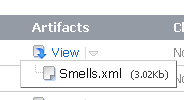
Although the Smells.xml file is not in a format which the CI system directly understands, it is an easily understandable format and would not be difficult to associate with an XSD file for display. (I am exploring with Dave at the moment whether the output could be altered for better integration with CI systems in the future.)

If you don't want to run the script as part of a CI process, it does have a GUI element to it - you'll note I used the SupressGUI parameter above, if you exclude this parameter then the GUI will be run to return the results to you.
The choice to use powershell rather than SQL to analyse the database scripts has both pros and cons, the trade-off being that whilst you can examine specific scripts outside the database, you don't have the easy extensibility for those not familiar with powershell. This may include many database devs/DBAs, although powershell is becoming more widely adopted. I feel that this is a distinguishing feature which gives TSQLSmells an edge - it allows scripts to be examined outside of a database, and to allow them to be examined before they are put into the final environment. Although I am in this example using a source controlled database, there is no reason why the database need be involved at all. This gives an ability for a sanity check to be light-weight - and therefore run ad-hoc more frequently.
I think that this script shows great promise and will for me form another method of screening code for potential issues. Whilst it's not a cast-iron guarantee of a problem, it's a useful way of highlighting potential problems, and gives a list of files to check in more detail.
Thursday, 11 October 2012
How do you convince the business that Source Control for databases is a good idea?
Read on to find out how you can win software to help you integrate Source Control into your development environment!
Why is it good for developers?
What does the business get?
Win a Red Gate Source Control license!
What is source control?
Source control is a means of keeping every change you make to your code, so that you can at any point see what's changed, or go back to a point in time. This is a relatively new concept to database developers, who are used to dealing with the database as a database, not as a collection of objects and data which can be scripted.
Source control has been in use by application developers for many years – and there are many flavours to choose from; some open-source (e.g. Git, Subversion), some closed source (Accurev, Team Foundation Server). There are many pros and cons to each system, and there’s a good source control comparison here which may help to work out which might suit you best. You may have one elsewhere in the business which can be used. This may help to reduce resistance to adoption – but you need to ensure that the source control system you choose can work for you.
Source control has been in use by application developers for many years – and there are many flavours to choose from; some open-source (e.g. Git, Subversion), some closed source (Accurev, Team Foundation Server). There are many pros and cons to each system, and there’s a good source control comparison here which may help to work out which might suit you best. You may have one elsewhere in the business which can be used. This may help to reduce resistance to adoption – but you need to ensure that the source control system you choose can work for you.
The second linked area to consider is integration with your
development environment. I find that application switching is time consuming
and saps concentration – so I want an easy to use solution which isn’t going to
distract me. Some developers will use SQL Server Management Studio for database
development, others will use Visual Studio. Some even use a text editor like Notepad.
With the exception of the latter category, there are tools that will integrate
with your environment to some degree or another - whatever you use.
A key factor in how you use source control is whether you go
for a shared
development model, or a dedicated model. Whilst there are advantages to
both, I've found that the dedicated model integrates better with source
control, and developer SQL Server editions are really quite cost effective so
the cost of multiple systems is less of a factor than it once was.
It is perhaps worth noting that many developers have very strong feelings about the source control system that they are comfortable with, and the reasons they don't like others. I suggest that before you fully implement a given source control system you think about your workflow, what you are trying to develop, and read the adverse comments about your chosen source control system. You'll no doubt find reasons others don't like it - and you can then get a better feeling as to whether this could prove a problem for your team in the future.
It is perhaps worth noting that many developers have very strong feelings about the source control system that they are comfortable with, and the reasons they don't like others. I suggest that before you fully implement a given source control system you think about your workflow, what you are trying to develop, and read the adverse comments about your chosen source control system. You'll no doubt find reasons others don't like it - and you can then get a better feeling as to whether this could prove a problem for your team in the future.
Why is it good for developers?
Source control gives you version control of your changes including history for all changes –
and a dedicated development model will allow you to do your work without
affecting others – yet also work collaboratively should you wish to. The use
of database continuous integration requires source control – or at least a
predictable build script. I’m lazy – and so I prefer to get the easiest option,
in this case source control. Continuous Integration is a key component of
certain development methodologies such as Agile (Scrum, etc.) so if your company is looking at implementing these then you may need to consider it.
One area where Database scripting tools have previously
lacked polish is upgrade scripts – how to make DDL changes without losing data,
or having to script each upgrade. This saves time and allows a repeatable
upgrade – which is great for ensuring your production systems can be
predictably upgraded, and even lead on to continuous deployment. Source control allows upgrade ("migration") scripts to be used to convert between specific, known versions of the software. Most tools will "guess" and some allow you to override specific changes and save the override.
Features such as branches or streams
allow you to develop new code separately to patches to existing systems, and
have a way to get to the database code at any point in time. By having your
application in the same source control as your database, you give yourself the
key ability to get your application and database from any given point, in a
cohesive way so that you know it should build – which is great for reproducing
the system in a known state, for bug fixes etc. You can use the power of your source
control system to get change history, and follow changes to help resolve
issues.
Really key however in my opinion is getting the solution integrated into the development environment. This really reduces the overhead of having source control, and thus you get benefits more quickly. This can often be the first area to suffer when costs are cut, and reduces the immediate productivity benefit of the solution.
Really key however in my opinion is getting the solution integrated into the development environment. This really reduces the overhead of having source control, and thus you get benefits more quickly. This can often be the first area to suffer when costs are cut, and reduces the immediate productivity benefit of the solution.
What does the business get?
For any change to development methodologies to become
adopted by an organisation, it needs to be bringing something to the business –
not just making Developers’ lives easier. So what does Source Control give the
business?
A good source control implementation will mean that
developers are developing against the same code base – less need for concern
about a forgotten table, so the resultant installation will be repeatable.
This means it scales well for new employees, and existing employees are usually
given a list of changed files/objects – so you’re less susceptible to human error in
forgetting to check in a change.
The business may want to support a number of different
versions of the product – for example customer specific installations, or
support of previous releases for a period of time. By having the application
and database code in the same source control repository you know you are always looking at a
consistent version of all layers (e.g. Application, Data Access Layer, and
Database) so you know it will all hang together.
Increasingly we live in a world where auditing is required.
Source control gives you an ability to know when a change was made, and by
whom. With the aid of a standard style of commit message, you can also know why
the change was made (perhaps a link to the support ticket or feature request?). Using Source Control provides you with a known truth for the database under development. Think how much time and worry it could save if you know exactly where to get all the database changes to implement, and you know that it's all being backed up for safe keeping should the worst happen.
By implementing Source Control you lower the barriers to implementing
deployment testing, perhaps within a continuous integration environment. This
means you can test your deployment on supported hardware/software
configurations and run a standard set of tests to give confidence in the
product. I’ve previously written about how to set this up.
Why doesn’t everyone use it already?
Whilst application developers have used source control for a number of years, it is relatively new to the database development scene, and as such the tools to make it easy have only started to appear in the last year or so. Database developers (and particularly DBAs who need to be on board) are often reluctant to leap to the latest change until it has been proven to be robust and reliable. This isn't a bad thing - new tools and ways of working take time to adopt, and you want to be sure you have the right one.
Adopting source control is a change to the toolset. You need therefore to be aware that it will take investment in the short term, to yield benefit in the longer term. Immediate benefits in terms of having a central location for all changes which can be easily backed up and rolled back is something often overlooked by those who haven't used such systems in the past.
Adopting source control is a change to the toolset. You need therefore to be aware that it will take investment in the short term, to yield benefit in the longer term. Immediate benefits in terms of having a central location for all changes which can be easily backed up and rolled back is something often overlooked by those who haven't used such systems in the past.
To get a change in the development practices and tools, you need a champion in the business - this is really important - because developer led
solutions rarely get the budget approval (in terms of time or money) to proceed. You do of course need a
development team that is open to it too!
In terms of costs, this will depend somewhat upon the size of your team, but more importantly the features that you want to deploy, and whether you go for a commercial or free product. There's no right answer here - but I suggest you start at the features you want, and go from there - the cost of a commercial product is offset by support, and the adoption costs of any source control systems should be quickly made back in terms of increased productivity and reduced errors. If you want to adopt the dedicated model (which I recommend to avoid conflict) then you'll need to think about a developer database installation - these can be quite cost effective, and may be covered by existing licensing (e.g. MSDN). You need to also think about licensing for a continuous integration server if you're going that way - it's often not included in the team's tooling licenses (but this could be done slightly later, once the team has become comfortable with source control). You need to budget some space for the code repository to live (and be backed up) as well as some time to manage the system - at least in its early days whilst things are settling down.
The most important side is probably the user side - but I have found that it is sometimes helpful to try it with a small group first, to allow any problems with workflow to be picked up and the tooling choice confirmed.
Overall
Why not try it? You can adopt it in stages - perhaps start using it only on a new project, or run source control in parallel with your current arrangement. The business benefits of having a more robust development process are clear, particularly where you have many flavors of your product. It allows a better isolation between development and production (important for certain industries).
Source control is rapidly becoming a must have for database developers, in the way that it as been for application developers for some time.
Source control is rapidly becoming a must have for database developers, in the way that it as been for application developers for some time.
Win a Red Gate Source Control license!
If I haven’t convinced you that it’s a better way to work –
why not find out for yourself for free? Red Gate have kindly provided 5 licenses for their Source Control product to give away! Red Gate's Source Control software is an interface with SQL Server Management Studio, to give a user friendly way of scripting out all of your changes and checking them into your source control system, as well as implementing others' changes in your database. It can work with Subversion (GPL), TFS, Vault, as well as many other systems you may already have (I've used it with Accurev), or even to a file location, to allow you to try out source control for databases in your environment.
To be in with a chance of winning, simply tweet a link to this post and leave a comment below, including your twitter handle so we can contact you. For example, why you think that database source control is a good/bad idea? Why not detail your experiences - good or bad - of using or adopting source control for databases? If you don't leave your twitter handle you can't win - sorry!
Because there's no right or wrong answer - it's all based on your viewpoint - this is a prize draw. You can enter until 26th October 2012 (23:59 BST).
To be in with a chance of winning, simply tweet a link to this post and leave a comment below, including your twitter handle so we can contact you. For example, why you think that database source control is a good/bad idea? Why not detail your experiences - good or bad - of using or adopting source control for databases? If you don't leave your twitter handle you can't win - sorry!
Because there's no right or wrong answer - it's all based on your viewpoint - this is a prize draw. You can enter until 26th October 2012 (23:59 BST).
Subscribe to:
Posts (Atom)