Users of SQL Test and the tSQLt framework upon which it is based have noted in the past that because test objects are stored in the database, they can be difficult to differentiate from the objects under test. This has been a barrier to some users adopting tSQLt for unit testing, as it prevented separate management of tests and raises the potential danger of tests being accidentally deployed within a production environment.
Recently I have been using tSQLt within SSDT (following this method by Ken Ross), and it occurs to me that this method of controlling unit tests allows us to keep the code under test in a different project to our tests, and therefore overcome the difficulty of keeping our tests as database objects. When we have our tests in a separate project within the same solution, we can choose to deploy either the tests with our code under test or simply the code itself without the tests. By configuring the test project to ensure that it requires the code under test to also be deployed at the same time and into the same database, we can set up publish definitions for the tests to our development machine and also a publish definition for just the code under test. It's the latter which we would use to deploy outside of our development workstation, for example to UAT. It also means that if you deploy by DACPAC the tests have never been in that package, so it is ready to deploy to each environment without your needing to take any additional steps.
Of course, a Continuous Integration engine has access to both projects within the solution from source control so it can either include unit tests or not, depending on your desired build action.
By having both the code under test and the tests themselves within the same solution, we can use the same source control process allowing both the code under test and the tests themselves to be in one place, which prevents drift between the test and the code under test.
When developing databases in SSDT, using this method gives me the best of both worlds; tests which to live with the database under development including within source control, and yet do not need to be removed from the database as part of or after the deployment process.
Showing posts with label SQL Test. Show all posts
Showing posts with label SQL Test. Show all posts
Wednesday, 26 February 2014

Friday, 13 December 2013
Learn how to unit test your databases from the comfort of your desk!
Following on from my previous posts on tSQLt, I've recorded a training course for Pluralsight which goes through how to use tSQLt and SQL Test to unit test your databases, to give you confidence in your database code.
I've used SQL 2012 Developer Edition for the course, but tSQLt will work with any version of SQL from 2005 SP2 upwards, and you don't need to purchase SQL Test to follow along.
Pluralsight offer a 10 day free trial of their service, so you can try before you buy.
My three hour course takes you through why you would want to unit test, and introduces the tools we will use. I then show you how to write your first unit test, before going into more detail on how to isolate dependencies, and the variety of things to test for. We look at how to unit test in your day to day workflow, before looking at some more advanced topics, like using unit tests to enforce development standards.
The course assumes you are familiar with T-SQL code and stored procedures, but have not used tSQLt before, so it should be of interest to those new to the concept of database unit testing as well as those who have dabbled with tSQLt or SQL Test.
To see the course, or the detailed list of content, click here.
I've used SQL 2012 Developer Edition for the course, but tSQLt will work with any version of SQL from 2005 SP2 upwards, and you don't need to purchase SQL Test to follow along.
Pluralsight offer a 10 day free trial of their service, so you can try before you buy.
My three hour course takes you through why you would want to unit test, and introduces the tools we will use. I then show you how to write your first unit test, before going into more detail on how to isolate dependencies, and the variety of things to test for. We look at how to unit test in your day to day workflow, before looking at some more advanced topics, like using unit tests to enforce development standards.
The course assumes you are familiar with T-SQL code and stored procedures, but have not used tSQLt before, so it should be of interest to those new to the concept of database unit testing as well as those who have dabbled with tSQLt or SQL Test.
To see the course, or the detailed list of content, click here.
Tuesday, 12 March 2013
I'm sure my procedure does what it should!
 Last Saturday, the 9th March, was the day for SQL Saturday 194, held in Exeter in the UK. This event was organised by the SQL South West User PASS chapter.
From my perspective, the event seemed very well attended, and smoothly run. There were some nice touches too, like a beer and a pasty for every attendee with which to end the day, and people I spoke to had gotten a lot from the day. It was great to see so many people talking to sponsors and getting advice on their individual questions from the community. It's always amazing how much expertise there is available for free at SQL Community events!
The next SQL Saturday in the UK is in Edinburgh in June, but you can see the list of upcoming events here. There are other community events in the UK, including SQL Bits and SQL in the City. Why not come along to one? Many also run pre-con sessions, which is a cost-effective way of getting SQL Server training.
I'd like to thank those who attended my session, and also Red Gate who were kindly able to supply me with some licenses for their SQL Test product to give away. I hope that you get started unit testing your procedures and gain confidence that they do what they should, too!
My session on unit testing databases, "I'm sure what my procedure does what it should!" used the tSQLt framework to show how to write repeatable unit tests for your databases. If you would like my session slides and scripts, they are available for download here. Please do drop me a line (I'm @d_a_green on twitter) or post a comment below if you have any further questions.
Wednesday, 20 February 2013
Upgrading your tSQLt version for SQL Test users
Those of you using Red Gate's excellent SQL Test product to have unit testing integrated within SSMS may be aware that it uses the tSQLt framework internally.
The tSQLt framework is open source and updates quite frequently, often adding new features. I have sometimes found myself needing a newly released feature, but been unable to get it from SQL Test, when Red Gate haven't yet adopted the updated version. However, there is a way that you can upgrade the version of tSQLt that a database uses, and still use the integration from SQL Test. It can be source controlled in the same way and allows you to adopt the latest version; you can also use this method to downgrade if you need to.
In this post I'm going to show you how to do it.
Firstly, let's establish what version of tSQLt you have installed. I'm going to use the example database installed by SQL Test for this post. If you haven't installed the sample, you can do this by clicking the button at the bottom of the SQL Test window (you may need to scroll down if you have a number of databases with tests in them):

This will bring up the window which allows you to add a database to SQL Test - at the bottom of which is a link to "Install Sample Database". This installs a database called tSQLt_Example.
We can see the installed version with the tSQLt.Info() function:
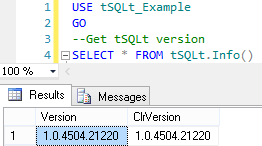
However, what if we want to use the new AssertLike function? It was only released in the latest version (1.0.4735.30771), so if we try to get the OBJECT_ID of 'tSQLt.AssertLike' we will get a null result.
We need to download the latest version of tSQLt, which you can get here. It downloads as a zip file, which contains three SQL script files:
Firstly, let's establish what version of tSQLt you have installed. I'm going to use the example database installed by SQL Test for this post. If you haven't installed the sample, you can do this by clicking the button at the bottom of the SQL Test window (you may need to scroll down if you have a number of databases with tests in them):

This will bring up the window which allows you to add a database to SQL Test - at the bottom of which is a link to "Install Sample Database". This installs a database called tSQLt_Example.
We can see the installed version with the tSQLt.Info() function:
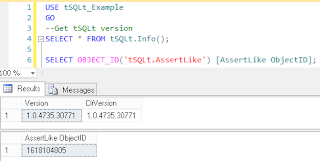
However, what if we want to use the new AssertLike function? It was only released in the latest version (1.0.4735.30771), so if we try to get the OBJECT_ID of 'tSQLt.AssertLike' we will get a null result.
We need to download the latest version of tSQLt, which you can get here. It downloads as a zip file, which contains three SQL script files:
- SetClrEnabled.sql - this sets the server up; if you have already installed a previous version you shouldn't need to run this.
- tSQLt.class.sql - this is the file that contains the latest release, and what we need to run.
- Example.sql - this installs the latest tSQLt_Example database (with tSQLt). You don't need to run this script. It will overwrite any existing copy of the tSQLt_Example database, and install the latest version (with sample tests).
So - open up the tSQLt.class.sql file in SQL Management Studio, and run it from your existing tSQLt-enabled database. This will re-register the latest version of the CLR for tSQLt, and install the new procedures.
We can now see the version of tSQLt has been upgraded, and that we have the tSQLt.AssertLike stored procedure installed:

You will find that SQL Test will now use the new version of tSQLt in those databases that you have updated.
Upgrading tSQLt in this way doesn't change the tests you have installed, and there is no problem with running different versions of tSQLt in different databases - this means that you can upgrade projects at different times. If you have source controlled your database, then the new version of tSQLt will be source controlled with your database too, so your tests will still work (including any new tSQLt functionality) for your colleagues and in your CI system.
This method doesn't change the version that SQL Test will install if you add tests to a database, so if you hit trouble you can simply uninstall tSQLt (using tSQLt.Uninstall) and use SQL Test to re-add the framework to your database; reverting like this shouldn't alter your existing tests, but any that you have written using new functionality would cease to work as expected.
Subscribe to:
Posts (Atom)