Showing posts with label tSQLt. Show all posts

Thursday, 30 January 2014

tSQLt adds Function Mocking to the unit testing armoury

The latest release of tSQLt (version V1.0.5137.39257) was published last week, and you can download this version in the usual place. If you're using SQL Test with tSQLt, you can upgrade SQL Test to the latest tSQLt release by following these instructions.

(Note, if you've not come across tSQLt before, it's a database unit testing framework written in T-SQL, and there's a great article explaining why you might want to use it here. Red Gate have written SQL Test to help integrate the power of tSQLt with the SQL Server Management Studio environment. This article assumes you're familiar with tSQLt, but if not I'd strongly encourage you to look at it for unit testing your databases.)

I am pleased to see that this release adds function mocking, as well as a simpler way to rename classes than the previous work around, and checking for a specific error number to tSQLt.ExpectException.

Let's look at that function mocking in a bit more detail. Consider a function which should add two numbers together. We would want to unit test it, and we can do that in the normal way, but a test on a stored procedure which needs to isolate from that function needs to call our new tSQLt method tSQLt.FakeFunction.


CREATE FUNCTION dbo.AddTogether (@a INT, @b INT)

RETURNS INT
AS
BEGIN
   RETURN
@a+@a

END;
GO

CREATE PROC Maths AS
  SELECT
dbo.AddTogether(1,2) AS SumOfNumbers
GO


Now, we can see there is a bug in the function above (and if we run the Stored procedure, we will get a value of 2 returned), but let's ignore that function and proceed to test our stored procedure. Remember, because we are isolating from our dependencies, we don't expect out stored procedure to fail its unit tests.

The way that FakeFunction works is that you need to supply it with a stub function to use in place of your function to be isolated. I suggest you put them in the test class. So let's create a simple function that returns a static value - 3.

EXEC tSQLt.NewTestClass @ClassName = N'MathsTests' -- nvarchar(max)
GO

CREATE FUNCTION MathsTests.Fake (@a INT, @b INT

RETURNS INT
AS 
BEGIN
   RETURN 3
END
GO

Now we are ready to create our test:

CREATE PROC MathsTests.[test I get a value of 3 returned when I add 1 and 2] 
AS
--Assemble
EXEC tSQLt.FakeFunction @FunctionName = N'dbo.Addtogether', -- nvarchar(max)
            @FakeFunctionName = N'MathsTests.Fake' -- nvarchar(max)

CREATE TABLE MathsTests.Expected (SumOfNumbers INT)
CREATE TABLE MathsTests.Actual (SumOfNumbers INT)
INSERT MathsTests.Expected (SumOfNumbers)
VALUES (3)

--Act
INSERT MathsTests.Actual
EXEC tSQLt.ResultSetFilter 1,'exec dbo.Maths'
--Assert
EXEC tSQLt.AssertEqualsTable @Actual = 'MathsTests.Actual'
                                               @Expected = 'MathsTests.Expected'
GO

If we run this test, we get a successful test, because the stored procedure under test returns a row with a value of 3, the expectation, as our code under test (the stored procedure) is isolated from the function which has the bug in it. Of course, you would want to ensure that any module from which you isolate is properly tested, so that you catch issues such as this, but this somewhat contrived example allows you to see how the true cause of the failure can then be found more easily.

The ability to fake functions in this way is a great addition to the unit test writer's armoury.

Friday, 13 December 2013

Learn how to unit test your databases from the comfort of your desk!

Following on from my previous posts on tSQLt, I've recorded a training course for Pluralsight which goes through how to use tSQLt and SQL Test to unit test your databases, to give you confidence in your database code.

I've used SQL 2012 Developer Edition for the course, but tSQLt will work with any version of SQL from 2005 SP2 upwards, and you don't need to purchase SQL Test to follow along.

Pluralsight offer a 10 day free trial of their service, so you can try before you buy.

My three hour course takes you through why you would want to unit test, and introduces the tools we will use. I then show you how to write your first unit test, before going into more detail on how to isolate dependencies, and the variety of things to test for. We look at how to unit test in your day to day workflow, before looking at some more advanced topics, like using unit tests to enforce development standards.

The course assumes you are familiar with T-SQL code and stored procedures, but have not used tSQLt before, so it should be of interest to those new to the concept of database unit testing as well as those who have dabbled with tSQLt or SQL Test.

To see the course, or the detailed list of content, click here.

Tuesday, 29 October 2013

Testing for Exceptions with tSQLt

I've recently been looking at two relatively new pieces of functionality in tSQLt, the unit testing framework that underpins Red Gate software's SQL Test.

I've written and presented about SQL Test and tSQLt before, including how to upgrade SQL Test to the latest version of tSQLt, but in case you've not been aware of these tools previously, tSQLt is a unit testing framework which allows SQL Server developments to be properly unit tested, within the database, and SQL Test is a user interface which makes it easy to see and run tests.

One of my gripes in the past has been the limited functionality for testing exceptions. Most applications will raise an error in some place or another, hopefully well captured and handled, but not always. Often the database needs to raise an error to feed back to the application, and this should be tested in the same way as any other requirement.
The problem which I have come across in the past is in how to prevent the inbuilt transaction handling capabilities of SQL server from rolling back the test transaction if you hit an error (tSQLt runs all tests in a transaction). This can cause the test to error, which of course is contrary to the desired behaviour. Previously I've had to use a catch-try block to set a variable which I then evaluated to check whether an exception had been raised.

That's where this new functionality comes in - we have two new functions, ExpectException and ExpectNoException which encapsulate the following command, watching for an exception, and pass or fail the test appropriately. ExpectException can even look out for a specific message, and fail if you get a different message.

So, a demonstration. Consider the following stored procedure:

CREATE PROC dbo.MyProc @Myvar INT
AS
IF
@Myvar != 1

BEGIN
  RAISERROR
('Variable is not one!',16,1)

END
GO

This will create a procedure that will error if you do not supply a valid input - a number 1. Clearly this is a fabricated example, but it illustrates the point.

This can be tested with the following test:

EXEC tSQLt.NewTestClass @ClassName = N'ExceptionTesting' -- Test class creation
GO


CREATE PROC ExceptionTesting.[test wait for exception old method]
AS
DECLARE
@error INT = 0 /* flag to indicate that an error was raised */

BEGIN TRY
  EXEC dbo.MyProc @Myvar = 2 /* the code under test */
END TRY
BEGIN CATCH
  SET @error = 1 /* Set variable as an error was raised */
END CATCH

IF @error != 1  /* Raise an error if the variable has not been set */
  EXEC tSQLt.Fail 'Exception was not raised'
GO

Which will fail the test if an exception is not raised. It is even possible to test for a specific message using ERROR_MESSAGE to determine this in the catch block.

The new functionality however makes this much more user friendly as a test, which of course makes this more maintainable.

So how would this test now look?

CREATE PROC ExceptionTesting.[test wait for exception new method]
AS

EXEC tSQLt.ExpectException @ExpectedMessage  = 'Variable is not one!'
  EXEC dbo.MyProc 2

GO


As you can see, this is much simpler, and easy to see what is being accomplished. It is also possible to check for specific messages (as has been done here), severities and states, as well as using pattern matching (for example for date or time based messages) as part of this same statement.

It is worth noting that this is defined in tSQLt as an expectation rather than an assertion, which may catch some out in terms of naming, but is sensible to denote that the expectation is before the code under test is run, whereas assertions happen afterwards.

Tuesday, 12 March 2013

I'm sure my procedure does what it should!

Last Saturday, the 9th March, was the day for SQL Saturday 194, held in Exeter in the UK. This event was organised by the SQL South West User PASS chapter.

From my perspective, the event seemed very well attended, and smoothly run. There were some nice touches too, like a beer and a pasty for every attendee with which to end the day, and people I spoke to had gotten a lot from the day. It was great to see so many people talking to sponsors and getting advice on their individual questions from the community. It's always amazing how much expertise there is available for free at SQL Community events!

The next SQL Saturday in the UK is in Edinburgh in June, but you can see the list of upcoming events here. There are other community events in the UK, including SQL Bits and SQL in the City. Why not come along to one? Many also run pre-con sessions, which is a cost-effective way of getting SQL Server training.

I'd like to thank those who attended my session, and also Red Gate who were kindly able to supply me with some licenses for their SQL Test product to give away. I hope that you get started unit testing your procedures and gain confidence that they do what they should, too!

My session on unit testing databases, "I'm sure what my procedure does what it should!" used the tSQLt framework to show how to write repeatable unit tests for your databases. If you would like my session slides and scripts, they are available for download here. Please do drop me a line (I'm @d_a_green on twitter) or post a comment below if you have any further questions.

Wednesday, 20 February 2013

Upgrading your tSQLt version for SQL Test users

Those of you using Red Gate's excellent SQL Test product to have unit testing integrated within SSMS may be aware that it uses the tSQLt framework internally.

The tSQLt framework is open source and updates quite frequently, often adding new features. I have sometimes found myself needing a newly released feature, but been unable to get it from SQL Test, when Red Gate haven't yet adopted the updated version. However, there is a way that you can upgrade the version of tSQLt that a database uses, and still use the integration from SQL Test. It can be source controlled in the same way and allows you to adopt the latest version; you can also use this method to downgrade if you need to.

In this post I'm going to show you how to do it.

Firstly, let's establish what version of tSQLt you have installed. I'm going to use the example database installed by SQL Test for this post. If you haven't installed the sample, you can do this by clicking the button at the bottom of the SQL Test window (you may need to scroll down if you have a number of databases with tests in them):


This will bring up the window which allows you to add a database to SQL Test - at the bottom of which is a link to "Install Sample Database". This installs a database called tSQLt_Example.

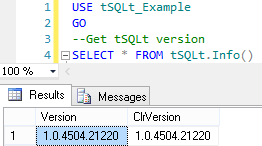
We can see the installed version with the tSQLt.Info() function:


However, what if we want to use the new AssertLike function? It was only released in the latest version (1.0.4735.30771), so if we try to get the OBJECT_ID of 'tSQLt.AssertLike' we will get a null result.

We need to download the latest version of tSQLt, which you can get here. It downloads as a zip file, which contains three SQL script files:

  • SetClrEnabled.sql - this sets the server up; if you have already installed a previous version you shouldn't need to run this.
  • tSQLt.class.sql - this is the file that contains the latest release, and what we need to run.
  • Example.sql - this installs the latest tSQLt_Example database (with tSQLt). You don't need to run this script. It will overwrite any existing copy of the tSQLt_Example database, and install the latest version (with sample tests).
So - open up the tSQLt.class.sql file in SQL Management Studio, and run it from your existing tSQLt-enabled database. This will re-register the latest version of the CLR for tSQLt, and install the new procedures.

We can now see the version of tSQLt has been upgraded, and that we have the tSQLt.AssertLike stored procedure installed:


You will find that SQL Test will now use the new version of tSQLt in those databases that you have updated. 

Upgrading tSQLt in this way doesn't change the tests you have installed, and there is no problem with running different versions of tSQLt in different databases - this means that you can upgrade projects at different times. If you have source controlled your database, then the new version of tSQLt will be source controlled with your database too, so your tests will still work (including any new tSQLt functionality) for your colleagues and in your CI system.

This  method doesn't change the version that SQL Test will install if you add tests to a database, so if you hit trouble you can simply uninstall tSQLt (using tSQLt.Uninstall) and use SQL Test to re-add the framework to your database; reverting like this shouldn't alter your existing tests, but any that you have written using new functionality would cease to work as expected.

Monday, 31 December 2012

Testing variable messages just got easier in tSQLt

I recently noticed that the open source unit testing framework I use (and have previously written about) - tSQLt - has had a new release, and with it a new type of assert. Asserts are how you test whether the result you got in a test was what you wanted, and hence whether the test should pass or fail.

This new assert routine, AssertLike, solves one of the more common situations which I've had to work around - that where you know roughly the message you are checking for, but not the totality of it. Let's take the example of a stored procedure which gets all addresses for a given state ID. This is somewhat contrived - there are reasons why you wouldn't do exactly this in a real application, but it makes for an easy to follow example. I'm using the AdventureWorks 2012 database.

/*
   Version       :  1.0
   Written on    :  26/12/2012
   Written by    :  Dave Green
   Purpose of SP :  To retrieve all address records in a given state.
*/

CREATE PROCEDURE dbo.usp_GetAddressesInState
@StateProvinceCode VARCHAR(100)
AS

DECLARE
@StateProvinceID INT, @ErrorMessage VARCHAR(100)

--Attempt to get province ID from StateProvince table
SELECT @StateProvinceID = StateProvinceID 
 FROM Person.StateProvince 
 WHERE StateProvinceCode = @StateProvinceCode


IF @StateProvinceID IS NULL --If the stateprovince wasn't valid, raise an error
BEGIN
   SET
@ErrorMessage = 'Unable to get StateProvinceID'
  
RAISERROR (@ErrorMessage,16,1)

END
--Return customer records

SELECT  AddressID ,
        
AddressLine1 ,   AddressLine2 ,
        
City ,    StateProvinceID ,
        
PostalCode ,  SpatialLocation ,
        
ModifiedDate

FROM Person.Address WHERE StateProvinceID = @StateProvinceID
GO

This Stored Proc checks that the Province ID exists before it returns the results; this means that no results mean that there are no results, rather than an invalid (or not on record) state. This sort of distinction is quite common for applications where you want to return a more helpful message to the user to allow them to take action.

We can test this SP using the following tSQLt code:

/*
   Version       :  1.0
   Written on    :  26/12/2012
   Written by    :  Dave Green
   Purpose of Class :  Demo of AssertLike
*/
EXEC tSQLt.NewTestClass 'ALDemo'

GO

/*
   Version    :  1.0
   Written on :  26/12/2012
   Written by :  Dave Green
   Purpose    :  check that invalid States give an error
*/
CREATE PROCEDURE ALDemo.[test invalid State code produces error]
AS
/**********************************************
**** To verify that the SP throws an error 

**** when fed with an invalid state code
***********************************************/
--Assemble
--Act
  --  Execute the code under test

BEGIN TRY

 
EXEC dbo.usp_GetAddressesInState @StateProvinceCode = 'test' -- varchar(100)

   --Assert

 EXEC tSQLt.Fail 'Expected error was not thrown'
END TRY
          

BEGIN CATCH
 DECLARE @Actual NVARCHAR(MAX) = ERROR_MESSAGE()
 EXEC tSQLt.AssertEqualsString @Expected = N'Unable to get StateProvinceID', -- nvarchar(max)
    
@Actual = @Actual, -- nvarchar(max)
    
@Message = 'The error thrown was different to that which was expected' -- nvarchar(max)

END CATCH

GO
EXEC tSQLt.Run 'ALDemo' 
-- Run the test

This works successfully, and tests the proc, checking that the correct error message is thrown (i.e. there isn't another error which is causing the proc to fail first).

This is all well and good, but then a requirement for change comes that the error message shown to the caller should specify the erroneous value. This is easily accomplished in the SP:

/*
   Written on :  26/12/2012
   Written by :  Dave Green
   Purpose    :  Get address records for a given state.
*/

/* Updated by Dave Green 26/12/2012 to return any erroneous state in the error message.*/


ALTER PROCEDURE usp_GetAddressesInState
@StateProvinceCode VARCHAR(100)
AS

DECLARE
@StateProvinceID INT, @ErrorMessage VARCHAR(100)

--Attempt to get province ID from StateProvince table
SELECT @StateProvinceID = StateProvinceID 
FROM Person.StateProvince 
WHERE StateProvinceCode = @StateProvinceCode

IF @StateProvinceID IS NULL --If the stateprovince wasn't valid, raise an error
BEGIN
   SET
@ErrorMessage = 'Unable to get StateProvinceID - Province '

                       +@StateProvinceCode+' may be invalid.'
  
RAISERROR (@ErrorMessage,16,1)

END --Return customer records
SELECT  AddressID ,
        
AddressLine1 ,   AddressLine2 ,
        
City ,    StateProvinceID ,
        
PostalCode ,  SpatialLocation ,
        
ModifiedDate

FROM Person.Address WHERE StateProvinceID = @StateProvinceID
GO

However, how can we adjust the unit test to accommodate this? The error message will change each time the SP is called - to reflect the input parameter.

The answer has always been to put in place custom logic in the 'CATCH' block - 'If error message is like this, then fine, else fail'.
This is realised in code as:

BEGIN CATCH
  
DECLARE @Actual NVARCHAR(MAX) = ERROR_MESSAGE()
  
IF @Actual IS NULL OR @Actual NOT LIKE 'Unable to get StateProvinceID - Province % may be invalid.'
  
EXEC tSQLt.Fail @Message0 = 'The error thrown was different to that which was expected' 

END CATCH

Of course, if you are checking a specific value, or date/time, this gets more complicated. A line number in the error message makes life even more unpredictable. This is in my view a little ugly, and doesn't lead itself to easy reading in the same way that the simple assert did. The good news is that the latest version of tSQLt now has an AssertLike assert procedure, so we can now simplify this as:

BEGIN CATCH
 
DECLARE @Actual NVARCHAR(MAX) = ERROR_MESSAGE()
 
EXEC tSQLt.AssertLike @ExpectedPattern = N'Unable to get StateProvinceID - Province % may be invalid.', -- nvarchar(max)
     
@Actual = @Actual, -- nvarchar(max)
     
@Message = N'The error thrown was different to that which was expected' -- nvarchar(max)

END CATCH

The new assert gives us a standardised approach which also includes a null check (on both sides). This allows a neater approach than custom logic for this basic type of check, and has particular applicability where the line number of an error is reported back as part of the message. This is because tests would then not break solely for a comment being added to the procedure, thus reducing the work required to 'fix' such tests when such a comment is added.

This seems to me to be much neater, and should be more a maintainable test for the future too, as it follows the same form as asserts in other tests.

Wednesday, 19 September 2012

Displaying database unit test package names in CI

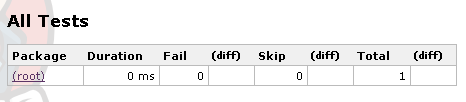
I've been using tSQLt tests for a while now with Continuous Integration, and one of the things I've noticed is that test results from nUnit or JUnit are presented with a nice package name, but that the tSQLt tests either have no package name, or list as (root) - depending on your CI system.

TeamCity

Jenkins

I have recently had the occasion to realise quite how annoying this can be, particularly if you're using Jenkins and running tests with the same names in multiple databases (TeamCity does list the database if you dig into the tests tab, but oddly not everywhere). This presents the problem that you can't easily see the name of the database in which a failure has occurred, to aid prompt troubleshooting.

So - I've done a little digging, and found this post on why this might be the case for Jenkins. I then modified the way which tSQLt tests are output to achieve the test labeling which Jenkins needs, i.e. "classname.testname". I felt that database name was the best class to suit my needs, but you can modify to suit your requirements.

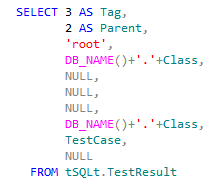
The modification is to [tSQLt].[XmlResultFormatter]. I changed the selects in the union, for example in the snippet below:


I've changed the 'Class' lines to read:


Do this for all the 'Class' lines in the procedure. There is 1 change in the second union, and 2 in each of the third and fourth unions.

Making this change gives us the following result when we re-run the tests from Continuous Integration:

TeamCity
Jenkins

As you can see this small modification helps to aid visibility to the test failure display.

Once you've modified the framework, you can either script the change as part of your build process, or if you have a source controlled database, then you can simply change the source controlled version of the [tSQLt].[XmlResultFormatter] stored procedure.

By the way - you can also output test execution times to your CI system by modifying this same procedure - see this mailing list post for details.

I think these changes really help to integrate database unit tests within the CI process, and make them easier to use in a complex development environment.

Wednesday, 12 September 2012

10 things I wish I'd known when I started with tSQLt and SQLTest

Simple Talk have published my article which details some tips and tricks I've learned about unit testing using the tSQLt framework. More details here.

Sunday, 2 September 2012

Agile Database Practice Training

As you will probably know from reading previous entries on this blog, I've become a convert to using Agile approaches to database development. When coupled with Continuous Integration and Test Driven Development, it can really help you to turn around database development quickly.

And it's not just developers who need to be part of this loop. Continuous Deployment and automated best practice testing can help allow DBAs to be responsive to deploying new developments, without huge amounts of extra work. The key advantage of this? You can turn around software developments more quickly - and that means you are more valuable, and your employer can do better in the market. At a the recent SQL in the City conference in London, Red Gate Software's Joint CEO Simon Galbraith gave a very impressive overview of how Agile approaches had helped Red Gate to achieve better market adoption and a product better tuned to market need by adopting Agile approaches.

The authors of the tSQLt database unit testing framework (which is what I use for database unit testing and test driven development) are running a course on how to get started. This covers everything from how to use tSQLt unit testing to write tests to how to adopt this within a CI environment and fit Agile development into the development cycle. The course follows the US tour of SQL in the City and you can find more details (and book your place!) on this website. It's not free, but should provide great business value to anyone looking to adopt Agile practices within database development, or as part of a wider development team. The course also includes a license for Red Gate's Source Control software, as well as an automation license and a discount on SQL Test - together worth $1235 - which gives you the tools necessary to get started.

It looks like a great course and one I wish had been held after the London SQL in the City event - the session that Dennis and Sebastian presented was a great introduction to tSQLt as a test framework.

Monday, 23 July 2012

Database CI the easy way
- A first look at Red Gate's new TeamCity plugin

Update (June 2014): Since this article was written, the folks at Red Gate have announced a new version of the plugin, which enhances and speeds up the setup process. You can read more about it here, and thanks to Alex for the comment below alerting me to it.

I was recently tipped the nod by David Atkinson of Red Gate that they have a new plugin for the TeamCity Continuous Integration system in Early Access Preview. The plugin allows GUI integration of SQL Compare with TeamCity build steps – a great improvement for those starting out with TeamCity who may not be familiar with how to set it up, and who might find command line steps a little daunting.

This means that this step in my earlier article at Simple Talk can now be streamlined and made much easier to use; this also applies to the steps I demonstrated at the recent SQL In The City conference in London.

Now, this new plugin doesn’t do things that you couldn’t do with the command line, but it does make the whole process easy to use, as well as easier for others to maintain. To me, this is a key part of getting people to use the system - if it is easy and well supported then you can more easily convince developers and managers that it can be adopted. It also makes your initial setup easier and avoids a lot of configuration errors! Of course, the nice interface doesn't prevent you using the command line if your needs are a little more bespoke.

So, let's have a look at the plugin then. Installation is manual, but easy – just drag and drop the plugin into the TeamCity Plugins directory. There’s some simple instructions included to help you if you’re not too sure.

One thing I should mention – you need to be on version 7.x of TeamCity. My test area wasn't, and I had to upgrade – but if you’re new to TeamCity you’ll probably be downloading and using the latest version.

As an example, let’s take an existing build configuration and update it to the new way of doing things.
So, my existing build steps (actually within a template, but the steps are the same whether you use templates or not) are: 


It's the second step, "Update database schema" which we are looking at. The actual step currently has the command line :
"C:\Program Files (x86)\Red Gate\SQL Compare 10\SQLCompare.exe" /scripts1:"%teamcity.build.checkoutDir%\Database" /database2:%DBName% /server2:"%SQLserver%" /ignoreparsererrors /sync
which I am sure you will agree is a little ugly.

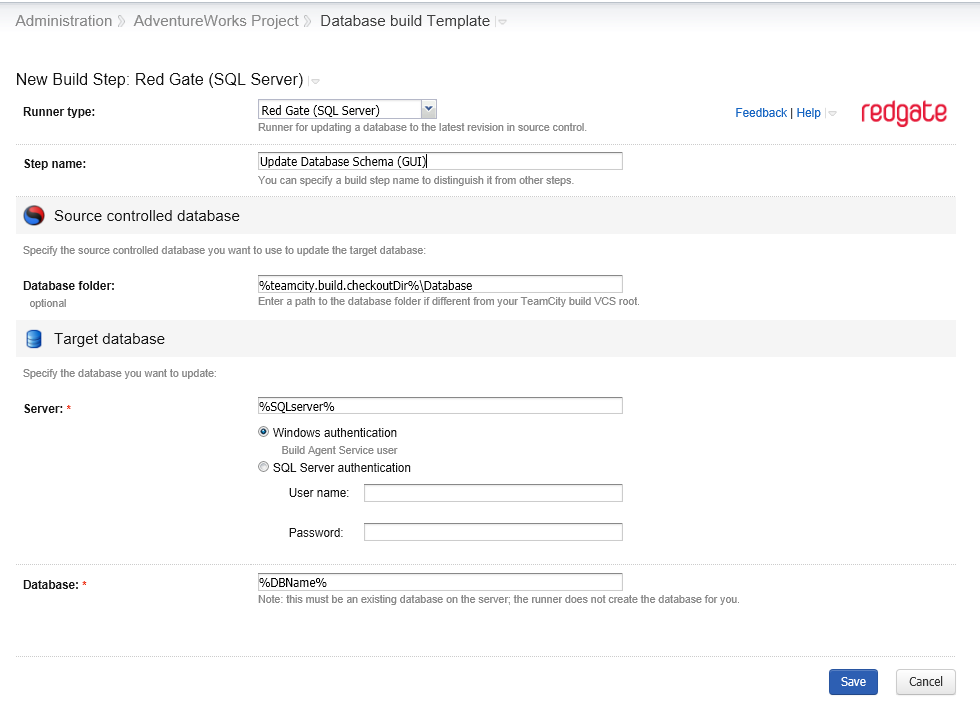
So let's create a new step (the Add Build Step link) and select the new build runner type of Red Gate (SQL Server):


This gives us a nice screen into which we can put the parameters previously used. I've used parameters here (which are defined as TeamCity build parameters) - but if you're not using parameters, standard file paths / server & database names are fine.

Note - I've used Windows Authentication here - I'd recommend you do the same if possible. That uses the Build Agent's credentials to authenticate to SQL Server. If you choose SQL Server Authentication, your access credentials will be stored and appear in the build log in plaintext, which isn't ideal. Red Gate assure me they are aware of this issue and are looking at how to resolve it.

So, having created the new step, I then disabled the previous step (there's nothing like having a simple rollback solution!) and re-ordered the build steps so the new one would execute at the same point in the build that the now disabled version had:


It's worth noting that the plugin helpfully makes the parameters used visible at this summary screen, which certainly helps to aid visibility of the process.

At this point, I ran a build, so that I can check the process is working.  The good news, of course, is that it did work.

Now, if we go to the build log of the process, we can see a little more detail:


A few things to note from this build log extract:
  1. The command line used is output as part of the build (highlighted above). This is great for debugging if things aren't quite as you expect, and gives a great starting point for your own tweaks to the process.
  2. The actual copy of SQL Compare used is unique to the plugin - it's not using the same version as if I'd launched it from the command line. This would be worth exploring if you're planning a version upgrade, and worth being aware of if troubleshooting. In this case the plugin is actually using a more up to date version than I have installed on my test system.
  3. Red Gate's Automation License is being used for this tool. As you will see from the screenshot above though, the tool comes with a free 14 day trial period.
As you can see this is a simple process to source control a database, and one that I can see being a great help in quickly getting up and running with continuous integration for databases, whether in a database-only build (as this simple example), or part of a bigger application test process.

I hope that Red Gate can expand this plug in to cover steps like clearing out the existing database (perhaps a tick box in the current implementation?) - this would cover my first step, which I think most implementations will want in order to give a predictable build. Another useful step would be to integrating with SQL Data Compare to load source controlled data into the database, which a number of implementations use. Ideally, a mature plugin would also run any SQL Test (i.e. tSQLt) tests defined in the database schema, and load the test results back in to TeamCity. This would then form a complete Continuous Integration solution for databases, without any need for the command line steps, and so allow easy adoption and maintenance. 

All in all I'm very pleased with the work that Red Gate have put in to producing an easy to use tool here; it's something that I can see fulfilling the majority of needs, and expanding over time to do more common Database CI tasks.

Why not drop Red Gate a line to give it a go yourself?